Claude Code Mods: 10 Tested Use Cases (2026)
Claude Code mods explained with 10 tested use cases: guard risky commands, mask secrets, add commands, panes and tools. Every example passes claude plugin test.

Table of contents
Claude Code mods are plugins whose JavaScript or TypeScript functions run inside Claude Code when something happens: a tool call, a prompt, a turn, a redraw. Below are 10 working mods for common jobs, from guarding risky commands to drawing panes, and every one passes claude plugin test.
TL;DR
Anthropic added mods to Claude Code on October 1, 2026, in version 2.1.287.12 A mod hooks an event and can watch it, rewrite it, or answer it in Claude Code's place, and it can draw panes, bands and status lines of its own.3
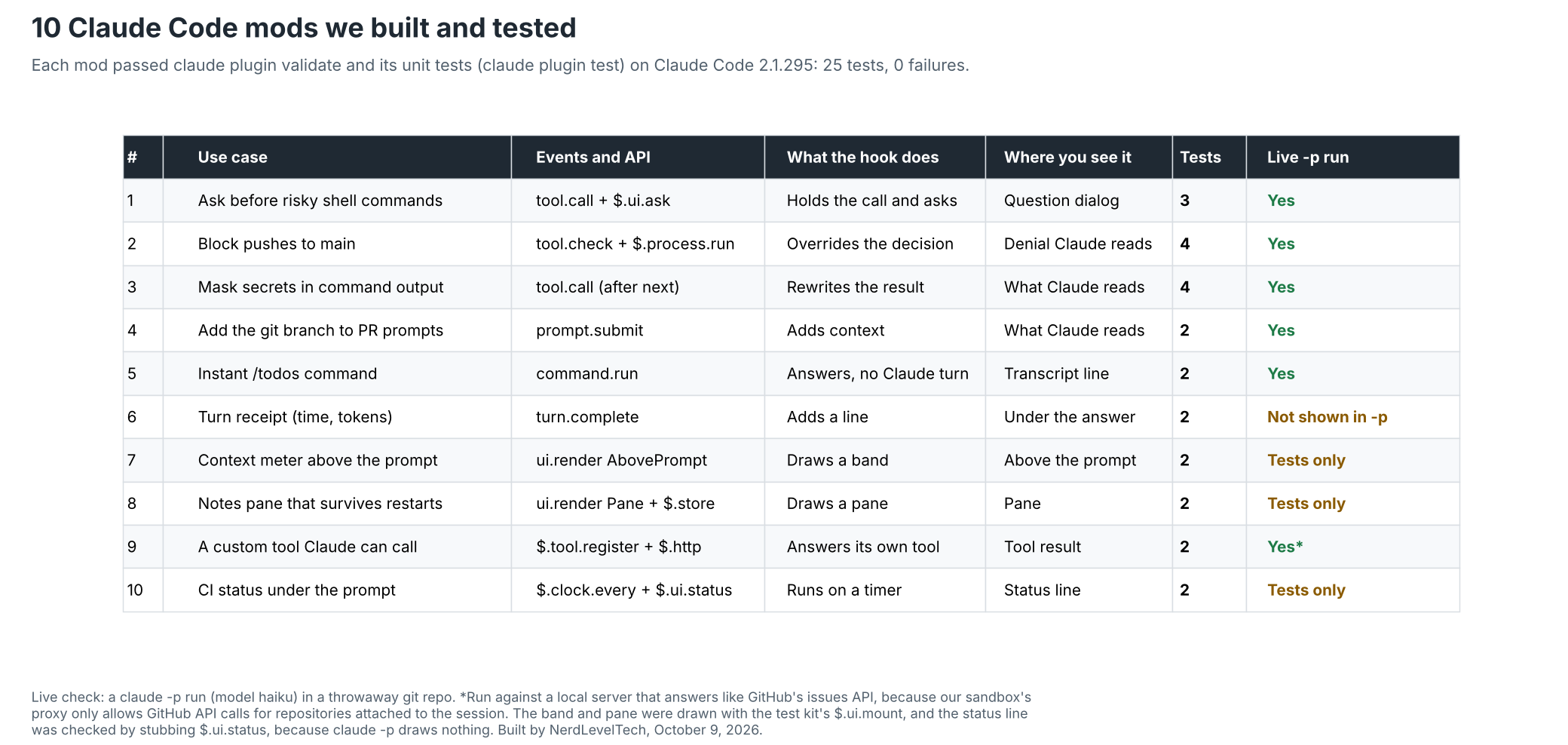
We wrote 10 mods for everyday jobs and checked them on Claude Code 2.1.295. All 10 pass claude plugin validate, all 25 unit tests pass, and six of them also behaved as expected in live claude -p runs. The code below is copied from the tested files.
Mods run with your permissions and are not sandboxed, so read a mod before you install it.3
What You'll Learn
- What a Claude Code mod is, and when to pick one over a settings hook, a skill or an MCP server
- The three files every mod needs, and how to load, validate and test one
- 10 tested use cases with full code: safety guards, prompt context, commands, panes, a custom tool and a background watcher
- What changed in the first week after launch, and the limits that trip people up
- How teams and organizations control which mods run
What is a Claude Code mod?
A Claude Code mod is a plugin whose code registers event handlers, called hooks.
Anthropic's docs put it this way: "A mod is a plugin that changes how Claude Code looks and behaves. It's made of JavaScript or TypeScript event handlers."3 The announcement describes them as "small TypeScript functions" that can rewrite a prompt, add new UI, replace a built-in feature, or add new functionality.1
Every hook gets the same three arguments:4
$, the mods API: every method a mod can call, grouped in namespaces such as$.ui,$.fsand$.processe, the event: plain, frozen data such as a tool call's name and argumentsnext, the next handler: it passes the event to the other mods and then to Claude Code's own behavior
What a hook does with next decides what kind of hook it is. Return next(e) and it only observes. Pass next a changed copy and it rewrites the event. Return a result without calling next and it answers the event itself, so Claude Code's own behavior never runs.5
Mods vs settings hooks, skills and MCP servers
Claude Code already had settings hooks, skills and MCP servers, and the docs compare all four. The short version: a mod is the only one that runs inside Claude Code's process and the only one that can draw in the interface.3
| Mod | Settings hook | Skill | MCP server | |
|---|---|---|---|---|
| What it is | Functions in a plugin that Claude Code calls in its own process | A shell command, HTTP request, or prompt that Claude Code runs on a lifecycle event | A SKILL.md file of instructions Claude reads | An external process or service that gives Claude tools |
| What it can change | Tool calls, prompts, commands, turns, and what the interface draws | Whether a tool call or prompt goes ahead, a tool call's arguments and result, and context added for Claude | What Claude knows and does | Which tools Claude has |
| Can it draw in the interface | Yes | No | No | No |
| What you write | JavaScript or TypeScript | A script plus a settings.json entry | Markdown | A server in any language |
| Pick it when | You want a pane, a band above the prompt, a custom command, or to rewrite an event | You want to block, allow, or log an event with a script you already have | You keep pasting the same instructions into chat | Claude needs to reach an external system |
Adapted from the Claude Code docs, "Mods overview".3 A plugin can hold all four, so a mod can ship next to a skill and an MCP server.
How do you build and test a Claude Code mod?
You need Claude Code 2.1.287 or later in the terminal. The Desktop app's Code tab runs mods from 2.1.286.3 You don't need Node.js or a build step, because Claude Code loads .js and .ts files directly.4
my-mod/
├── .claude-plugin/
│   └── plugin.json      # the plugin manifest: name, version, description
└── hooks/
    ├── hooks.json       # {"modules": ["./register.js"]} points at your code
    └── register.js      # your hooks module, which exports register(on)
Every mod in this post uses the same two JSON files, with only the name and description changed. Here they are for the first one:
{
  "name": "confirm-risky",
  "version": "0.1.0",
  "description": "Asks before Claude runs a destructive shell command",
  "author": { "name": "NerdLevelTech" }
}
{
  "modules": ["./register.js"]
}
Three commands cover the whole loop:476
# Load the mod for one session; Claude Code hot-reloads it when you save
claude --plugin-dir ./confirm-risky

# See what Claude Code reads from the mod: the events it hooks and the API calls it makes
claude plugin validate ./confirm-risky

# Run the mod's *.test.ts files with no session, sign-in or network
cd confirm-risky && claude plugin test
You can also describe the mod you want in a Claude Code session and let Claude write it. Claude uses a built-in skill named plugin-authoring for that, and the mod only runs once you approve it.4
How we tested these 10 mods
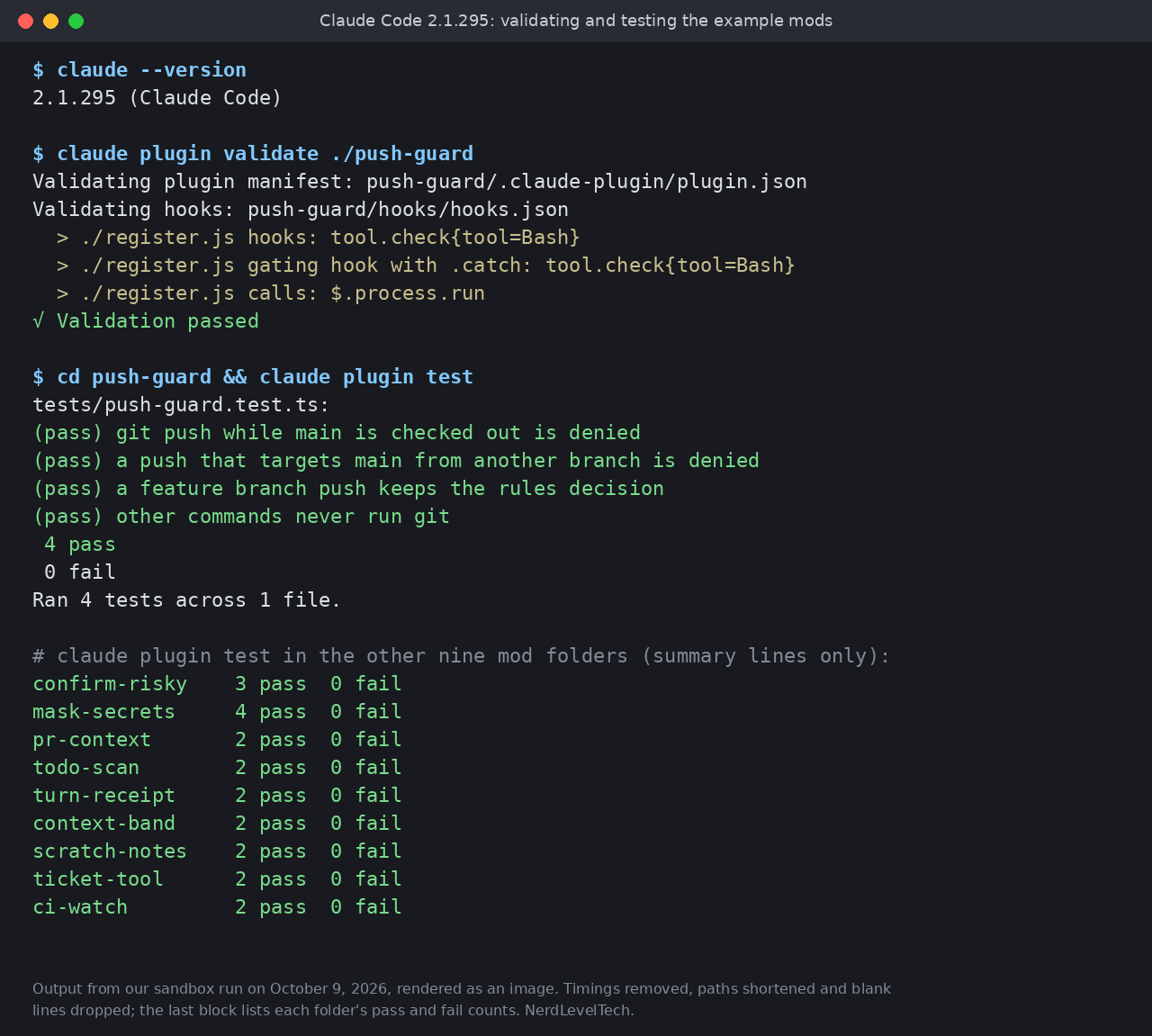
We wrote each mod by hand from the official docs and the type declarations Claude Code ships for its version, then ran three checks on October 9, 2026 with Claude Code 2.1.295:
claude plugin validateon every mod. All 10 passed.claude plugin testwith 2 to 4 tests per mod, 25 in total. All 25 passed.- Live
claude -pruns with the Haiku model in a throwaway git repository, for seven mods. Six behaved as expected. The seventh, the turn receipt, passes its tests, butclaude -pprints only the answer, so its line doesn't appear there and we checked it with tests only.
Mods that draw only appear in an interactive terminal or the Desktop app.3 We drew the band and the pane with the test kit's $.ui.mount, which renders a site without a session, and checked the status line by stubbing $.ui.status.7
A test is a TypeScript file that raises events and stubs whatever Claude Code would answer. This is the one for the push guard in use case 2. It answers $.process.run with a fake branch name, so no git runs:7
import { expect, test } from 'claude-code/testing'

// Stubs what the permission rules decided and what git says the current branch is,
// and counts how often the mod ran git
function stubs(on, branch: string, rules = 'allow') {
  const runs = { git: 0 }
  on('tool.check', () => ({ decision: rules }))
  on('process.run', () => {
    runs.git += 1
    return { value: { exitCode: 0, stdout: branch + '\n', stderr: '' } }
  })
  return runs
}

test('git push while main is checked out is denied', async ($, on) => {
  stubs(on, 'main')
  const out = await $.tool.check({ tool: 'Bash', input: { command: 'git push' } })
  expect(out.decision).toBe('deny')
})

test('a push that targets main from another branch is denied', async ($, on) => {
  stubs(on, 'feature/login')
  for (const command of ['git push origin main', 'git push origin HEAD:main', 'git push origin +main', 'git push origin feature/login:refs/heads/main', 'git push --force origin main;', 'git push origin "main"']) {
    const out = await $.tool.check({ tool: 'Bash', input: { command } })
    expect(out.decision).toBe('deny')
  }
})

test('a feature branch push keeps the rules decision', async ($, on) => {
  stubs(on, 'feature/login')
  const out = await $.tool.check({ tool: 'Bash', input: { command: 'git push origin feature/login' } })
  expect(out.decision).toBe('allow')
})

test('other commands never run git', async ($, on) => {
  const runs = stubs(on, 'main', 'ask')
  const out = await $.tool.check({ tool: 'Bash', input: { command: 'npm test' } })
  expect(out.decision).toBe('ask')
  expect(runs.git).toBe(0)
})
1. Ask before Claude runs a destructive shell command
Use this if you let Claude run shell commands but want a human check on the ones that can't be undone.
A tool.call hook can hold a tool call while it asks you a question. $.ui.ask shows the question in the dialog Claude uses for questions and resolves to the label you pick. It rejects when you dismiss it, and in a claude -p run where nobody can answer.5 So the hook starts from "Refuse" and only runs the command on an explicit "Run it".
// Commands worth a second look: recursive deletes (rm -r, -R, -rf, -f -r, rm dir -rf, --recursive),
// hard resets, and force pushes (--force, -f, or a +branch refspec)
const RISKY = [
  /\brm\b.*\s-[a-zA-Z]*[rR][a-zA-Z]*(?=\s|$)/,
  /\brm\b.*\s--recursive\b/,
  /\bgit\s+reset\s+--hard\b/,
  /\bgit\s+push\b.*(?:\s--force\b|\s-f\b|\s\+\S)/,
]

export function register(on) {
  on('tool.call', { tool: 'Bash' }, async ($, e, next) => {
    // Everything else runs as usual
    if (!RISKY.some((pattern) => pattern.test(e.command))) return next(e)
    // Start from the safe answer, so a question nobody answers refuses the command
    let answer = 'Refuse'
    try {
      // The tool call waits here until you pick an option; Refuse is listed first
      answer = await $.ui.ask('Run this command? ' + e.command, ['Refuse', 'Run it'])
    } catch {
      // Dismissed, or a claude -p run with nobody to ask
    }
    if (answer !== 'Run it') {
      return { deny: 'The user declined this command. Ask before trying another approach.' }
    }
    return next(e)
  }).catch(async ($, e, next) => {
    // If the guard itself fails before the command ran, refuse instead of failing open
    return next.called ? next(e) : { deny: 'The confirm-risky guard failed, so this command was not run.' }
  })
}
The .catch matters. A hook that throws or times out before it calls next is skipped, and the command would run. The .catch handler answers in its place, so this guard fails closed.5 Hooks defined in settings files fail open too, and onFailure is their equivalent; see Claude Code hook failures: onFailure block tested.
Three tests cover six safe commands that must not trigger a question (among them rm notes.txt, docker rm -f web and npm run build -- --force-color), eight risky ones that must be refused (rm -rf, rm -Rf, rm -R, rm -f -r, rm build -rf, rm --recursive, git reset --hard and a +main force push), and an approved git push -f.
Live, we asked Claude to run rm build -rf with the mod loaded. Claude replied "The command was declined, so nothing ran and build is untouched." The build folder was still there.
One caveat: the patterns are text matching. They miss destructive commands that don't look like these, such as find . -delete or a script that deletes files, so treat the mod as a speed bump, not a sandbox. It can also ask about harmless commands, such as grep -r run after a git rm. Refuse is listed first on purpose, so a careless Enter doesn't run the command.
2. Block pushes to main, whatever the rules say
This is for teams that want Claude to push feature branches but never main.
tool.check fires after your permission rules and settings hooks have decided whether a call may run, and next(e) resolves to that decision: allow, ask, or deny. A hook can return a different decision.5
That makes it the right event for a check that depends on what's true right now, such as the current branch. This mod refuses a push that names main as its target (origin main, HEAD:main, +main, refs/heads/main or a quoted "main"), and any push while main is checked out.
export function register(on) {
  // tool.check fires after your permission rules and settings hooks have decided
  on('tool.check', { tool: 'Bash' }, async ($, e, next) => {
    // What the rules decided: allow, ask, or deny
    const decided = await next(e)
    const command = e.input.command
    if (!/\bgit\s+push\b/.test(command)) return decided
    // A push that names main as its target: "origin main", "HEAD:main", "+main", "refs/heads/main", "'main'"
    const namesMain = /\bgit\s+push\b.*(?:[\s:+'"]|refs\/heads\/)main(?=$|[\s;&|'"])/.test(command)
    // Or any push while main is checked out
    const branch = await $.process.run(['git', 'branch', '--show-current'])
    const onMain = branch.exitCode === 0 && branch.stdout.trim() === 'main'
    if (!namesMain && !onMain) return decided
    return { decision: 'deny', reason: 'Pushing to main is blocked here. Push a feature branch and open a pull request instead.' }
  }).catch(async ($, e, next) => {
    // If the check fails, for example git can't run, refuse the push rather than let it through
    return { decision: 'deny', reason: 'push-guard could not check this push (' + next.error.kind + '), so it was refused.' }
  })
}
Four tests stub the branch name and the rules' decision, and one counts git runs to prove other commands never start it.
Live, with Bash(git push:*) allowed, git push origin main on main came back with "Permission to use Bash denied by plugin push-guard: Pushing to main is blocked here. Push a feature branch and open a pull request instead."
From a branch named feature/demo, git push origin HEAD:main and git push origin +main got the same refusal, and the remote only ever had a feature/demo branch.
A push of feature/demo itself was allowed and reported "Everything up-to-date".
The .catch refuses the push if the check itself fails, for example when git can't run. Still, the docs say plainly that a hook matching command text is a reminder for Claude. A spelling the pattern doesn't expect, such as git -C . push, gets through. A harmless command can be refused too, such as git push origin feature/login && git log main. To stop pushes to main for everyone, protect the branch on your Git host.5
3. Mask secrets in command output before Claude reads them
Reach for this when shell output can contain credentials, such as cloud config files or environment dumps.
This hook lets the command run, then rewrites what came back. The announcement lists redacting secrets from tool output as one of the things a mod can do with a single function.1 Returning a new result object, rather than the one next gave you, is what makes Claude read your version.
A failed command needs its own branch. Its output comes back with isError set and the text Claude reads in text, not as stdout.8 The mod masks that text and returns it as a deny, so Claude reads only the masked text.
// Common credentials: AWS key ids (AKIA, ASIA), AWS secret keys and session tokens,
// GitHub tokens, Slack tokens, and private key blocks
const SECRETS = [
  [/\b(?:AKIA|ASIA)[0-9A-Z]{16}\b/g, '[REDACTED]'],
  [/\b(aws_secret_access_key|aws_session_token)(\s*[=:]\s*)\S+/gi, '$1$2[REDACTED]'],
  [/\bgh[pousr]_[A-Za-z0-9]{36,}\b/g, '[REDACTED]'],
  [/\bgithub_pat_[A-Za-z0-9_]{22,}\b/g, '[REDACTED]'],
  [/\bxox[abprs]-[A-Za-z0-9-]{10,}\b/g, '[REDACTED]'],
  [/-----BEGIN [A-Z ]*PRIVATE KEY-----[\s\S]*?-----END [A-Z ]*PRIVATE KEY-----/g, '[REDACTED]'],
]

function redact(text) {
  return SECRETS.reduce((out, [pattern, replacement]) => out.replace(pattern, replacement), text)
}

export function register(on) {
  on('tool.call', { tool: 'Bash' }, async ($, e, next) => {
    // Let the command run, then look at what it printed
    const ran = await next(e)
    // A refused call has nothing to clean
    if (ran.deny !== undefined) return ran
    if (ran.isError) {
      // A failed command's output reaches Claude as error text
      const text = typeof ran.text === 'string' ? ran.text : typeof ran.result === 'string' ? ran.result : ''
      const masked = redact(text)
      if (masked === text) return ran
      $.ui.log('masked a credential in the error output of: ' + e.command.slice(0, 60))
      // An error result can't be rewritten in place, so withhold it and pass on the masked text
      return { deny: masked }
    }
    // Another mod may have answered with a plain string; leave that alone
    if (typeof ran.result !== 'object' || ran.result === null) return ran
    const stdout = redact(ran.result.stdout ?? '')
    const stderr = redact(ran.result.stderr ?? '')
    if (stdout === ran.result.stdout && stderr === ran.result.stderr) return ran
    $.ui.log('masked a credential in the output of: ' + e.command.slice(0, 60))
    // Return a new result, so Claude reads the masked text and not the original
    return { result: { ...ran.result, stdout, stderr } }
  }).catch(async () => {
    // If masking itself fails, withhold the output rather than pass it on unmasked
    return { deny: 'mask-secrets could not check this output, so it was withheld.' }
  })
}
Four tests check that an AWS key id and secret key are masked, that clean output and clean errors pass untouched, that a key in a failed command is masked, and that the .catch withholds output if masking fails.
Live, we put a fake AWS credentials file in creds.txt and asked Claude to quote cat creds.txt verbatim. With the mod, Claude quoted aws_access_key_id = [REDACTED] and aws_secret_access_key = [REDACTED]. Without it, an earlier run of the same prompt quoted the full fake key id. A failing command, cat creds.txt; exit 3, came back masked too.
It covers Bash output and only the patterns listed. Claude can still open the same file with the Read tool, so pair it with a guard on reads. Our earlier post shows one: a Claude Code mod that blocks .env reads.
4. Add the current git branch to prompts about pull requests
This saves you from typing repository facts into every prompt.
A prompt.submit hook sees each prompt before the turn starts. Passing next an event with an extra context entry adds text that Claude reads after your prompt, while the transcript still shows what you typed.5
export function register(on) {
  on('prompt.submit', async ($, e, next) => {
    // Leave prompts that don't mention a pull request alone
    if (!/\bPR\b|pull request/i.test(e.text)) return next(e)
    let git
    try {
      git = await $.process.run(['git', 'branch', '--show-current'])
    } catch {
      // git isn't installed, so send the prompt as it is
      return next(e)
    }
    // Outside a git repository there is no branch to add
    if (git.exitCode !== 0) return next(e)
    // Claude reads this line after your prompt; the transcript still shows what you typed
    return next({ ...e, context: [...(e.context ?? []), 'Current branch: ' + git.stdout.trim()] })
  })
}
Two tests check that a prompt mentioning a PR gets Current branch: feature/auth, and count git runs to prove other prompts never start it. Live, with Bash disabled so Claude couldn't look it up, a prompt mentioning a PR got the answer feature/demo. A question without a PR mention got "Unknown", because no branch was added.
Claude reads the added line with every prompt that matches, so keep it short and add it only when it's useful, as this mod does.
5. Add an instant slash command that skips the model
Some lookups don't need Claude to think at all.
A command registered by a mod runs your function at once, with no Claude turn.3 Register it in session.start, answer it in command.run, and add immediate: true so it also works while Claude is busy.9
export function register(on) {
  on('session.start', async ($, e, next) => {
    // immediate: true lets /todos run even while Claude is working
    await $.command.register({ name: 'todos', description: 'List TODO and FIXME lines in tracked files', immediate: true })
    return next(e)
  })

  on('command.run', { command: 'todos' }, async ($) => {
    let out
    try {
      // git grep searches tracked files only and needs no shell
      out = await $.process.run(['git', 'grep', '-n', '-I', '-E', 'TODO|FIXME'])
    } catch {
      return { text: 'Could not run git grep.' }
    }
    // git grep exits 1 when nothing matches
    if (out.exitCode === 1) return { text: 'No TODO or FIXME lines found.' }
    if (out.exitCode !== 0) return { text: 'git grep failed: ' + out.stderr.trim() }
    const lines = out.stdout.trim().split('\n')
    const shown = lines.slice(0, 20).join('\n')
    const more = lines.length > 20 ? '\n... and ' + (lines.length - 20) + ' more' : ''
    return { text: lines.length + ' TODO/FIXME lines:\n' + shown + more }
  })
}
Two tests cover a match and no match. Live, in a repository with two marked lines, claude -p "/todos" --plugin-dir ./todo-scan printed:
todo-scan: 2 TODO/FIXME lines:
app.js:2:// TODO handle empty input
app.js:3:// FIXME flaky retry
No model call was needed. Claude Code puts the plugin's name in front of a command's text.4
Watch the name you pick: $.command.register throws if a built-in command already uses the name, and a hook that throws is skipped, so register commands last in session.start or wrap them in try.9
6. Show a receipt under each answer: time taken and tokens used
Handy if you watch how long turns take or how many tokens they cost.
turn.complete fires when a turn ends. The event carries durationMs, the turn's token usage, and isAborted, and a hook can return a text field that shows as a line under the answer.5
export function register(on) {
  on('turn.complete', async ($, e, next) => {
    const result = await next(e)
    // Subagent turns and interrupted turns get no receipt
    if (e.agentId || e.isAborted) return result
    const seconds = (e.durationMs / 1000).toFixed(1)
    const tokens = e.usage ? ' · ' + e.usage.output_tokens + ' output tokens' : ''
    // A text other than the answer itself is shown under the answer
    return { ...result, text: 'Done in ' + seconds + 's' + tokens }
  })
}
Two tests check the line for a 12,345 ms turn with 420 output tokens (Done in 12.3s · 420 output tokens) and that an interrupted turn gets none. In a claude -p run only the answer is printed, so this line shows in an interactive session.
The hook skips subagent turns, which also fire turn.complete with agentId set.5
7. Draw a context meter above the prompt
It's useful when you want to see the context window filling up before it's full.
The band above the prompt is a render site every mod shares. A ui.render hook filtered to { component: 'AbovePrompt' } returns what to draw there, or next(e) to draw nothing.10 $.session.usage() returns the context window's tokens, window and percent, among other figures.6
// A 20-cell bar, filled in proportion to the percent used
function bar(percent) {
  const filled = Math.round(percent / 5)
  return '█'.repeat(filled) + '░'.repeat(20 - filled)
}

export function register(on) {
  // After each turn the context has grown, so ask for a redraw of the band
  on('turn.complete', async ($, e, next) => {
    const result = await next(e)
    $.ui.invalidate('ui.render')
    return result
  })

  on('ui.render', { component: 'AbovePrompt' }, async ($, e, next) => {
    // Give way to a survey that wants the band
    if (e.props.hasSurvey) return next(e)
    const { context } = await $.session.usage()
    // No reading yet, before the first response
    if (context.percent === undefined) return next(e)
    const { Text } = $.ui.resolve(e)
    const color = context.percent >= 80 ? 'red' : context.percent >= 60 ? 'yellow' : 'green'
    const used = Math.round((context.tokens ?? 0) / 1000) + 'k of ' + Math.round(context.window / 1000) + 'k'
    return Text({ color, children: ['context ' + bar(context.percent) + ' ' + context.percent + '% (' + used + ')'] })
  })
}
A drawing only changes when its hook runs again, so the mod calls $.ui.invalidate('ui.render') after each turn.10
The first test draws the band with $.ui.mount on both the terminal and desktop surfaces. With 84,000 of 200,000 tokens used, it draws context ████████░░░░░░░░░░░░ 42% (84k of 200k). The second test checks that nothing is drawn before the first reading.
Claude Code throttles redraws to 10 a second, or 30 in the terminal for a few sites, which is far more than this meter needs.6
8. Keep scratch notes in a pane that survives restarts
If you keep a running list of things to check while Claude works, put it in a pane.
/notes opens a pane with a text field. Each note gets an x button that deletes it, and the list is saved in $.store, a key-value store that lasts between sessions.10 This follows the notes example in the docs, with loading added.
const PANE = 'scratch-notes'

// The notes the pane draws, loaded from the store when the session starts
let notes = []

export function register(on) {
  on('session.start', async ($, e, next) => {
    const saved = await $.store.get('notes')
    if (Array.isArray(saved)) notes = saved
    await $.command.register({ name: 'notes', description: 'Open your scratch notes pane' })
    return next(e)
  })

  on('command.run', { command: 'notes' }, async ($) => {
    await $.ui.open({ id: PANE, title: 'Notes', focus: true, closeOnEscape: true })
    // Print nothing in the transcript
    return {}
  })

  on('ui.render', { component: 'Pane' }, async ($, e, next) => {
    // Leave other mods' panes alone
    if (e.requestId !== PANE) return next(e)
    const { Box, Text, Button, Input } = $.ui.resolve(e)
    const save = async () => {
      $.ui.invalidate('ui.render')
      await $.store.set('notes', notes)
    }
    return Box({
      flexDirection: 'column',
      children: [
        Input({
          key: 'new-note',
          label: 'Note',
          placeholder: 'Type a note and press Enter',
          value: '',
          submitLabel: 'add',
          autoFocus: true,
          onSubmit: async (value) => {
            if (!value.trim()) return
            notes = [...notes, value.trim()]
            await save()
          },
        }),
        ...notes.map((note, i) =>
          Box({
            flexDirection: 'row',
            columnGap: 1,
            children: [
              Button({
                key: 'delete-' + i,
                label: 'x',
                plain: true,
                onPress: async () => {
                  notes = notes.filter((_, j) => j !== i)
                  await save()
                },
              }),
              Text({ children: [note] }),
            ],
          }),
        ),
      ],
    })
  })
}
The first test types a note, checks it's drawn, deletes it, and checks the saved list on both the terminal and desktop surfaces. A second test checks that notes saved earlier come back after session.start.
Keep in mind that $.store is shared by every session on your machine, and a get followed by a set isn't atomic, so two sessions can overwrite each other's change.10 The store holds up to 4 MiB of JSON.6
9. Give Claude a custom tool without running an MCP server
Teams often want Claude to look something up in one of their own systems.
$.tool.register adds a tool Claude can call. Claude sees it under a longer name, mcp__<plugin>__<tool>, and your tool.call hook for that full name answers it.9
This one fetches a GitHub issue. GitHub's REST docs say requests with no User-Agent header are rejected, which is why the mod sends one.11 An optional TICKET_API_BASE environment variable, read with $.env.get, points it at GitHub Enterprise or a test server.9
export function register(on) {
  on('session.start', async ($, e, next) => {
    await $.tool.register({
      name: 'github_issue',
      // Claude decides when to call the tool from this description
      description: 'Look up a GitHub issue or pull request and return its title, state, labels and first 1,500 characters',
      inputSchema: {
        type: 'object',
        properties: {
          repo: { type: 'string', description: 'owner/name, such as anthropics/claude-code' },
          number: { type: 'integer' },
        },
        required: ['repo', 'number'],
      },
    })
    return next(e)
  })

  // The full name is mcp__, the plugin's name, two underscores, and the tool's name
  on('tool.call', { tool: 'mcp__ticket-tool__github_issue' }, async ($, e) => {
    if (!/^[\w.-]+\/[\w.-]+$/.test(e.repo)) return { result: 'repo must look like owner/name' }
    // GitHub by default; set TICKET_API_BASE to point at GitHub Enterprise or a test server
    const base = (await $.env.get('TICKET_API_BASE')) ?? 'https://api.github.com'
    const url = base + '/repos/' + e.repo + '/issues/' + Number(e.number)
    const response = await $.http.fetch(url, { headers: { accept: 'application/vnd.github+json', 'user-agent': 'ticket-tool-mod' } })
    if (!response.ok) return { result: 'Lookup failed with status ' + response.status }
    let issue
    try {
      issue = JSON.parse(response.text)
    } catch {
      return { result: 'The lookup returned something that is not JSON' }
    }
    const labels = (issue.labels ?? []).map((l) => l.name).join(', ') || 'none'
    return {
      result: '#' + issue.number + ' ' + issue.title + '\nstate: ' + issue.state + '\nlabels: ' + labels + '\n\n' + (issue.body ?? '').slice(0, 1500),
    }
  }).catch(async ($, e, next) => {
    // A network error or a timeout becomes a result Claude can read
    return { result: 'The issue lookup failed: ' + next.error.kind }
  })
}
Two tests stub $.http.fetch: one checks the GitHub URL and the summary for a found issue, the other checks that TICKET_API_BASE changes the URL and that a 404 is reported.
Our first live run against api.github.com got HTTP 403, because our sandbox's network proxy only allows GitHub API calls for repositories attached to the session.
So we ran it live against a small local server that answers like GitHub's issues endpoint. Claude called the tool and replied with the title, state and labels the server sent (Export button does nothing, open, bug, p1), and the server log showed the request with the mod's User-Agent.
GitHub allows more requests per hour when you authenticate.11 For private repositories, read a token with $.env.get and send it as a header.9
10. Watch CI and show the result under the prompt
This one helps while you wait on a pull request's checks and keep working.
Work that outlives one event runs on a timer started in session.start. $.clock.every replaces setInterval, and $.ui.status sets one line under the prompt that stays until you change it.9
This mod asks the GitHub CLI for the current pull request's checks once a minute. gh pr checks --json includes a bucket field that sorts each check into pass, fail, pending, skipping or cancel.12
// Turn gh's JSON into a short line such as "3 pass · 1 fail · 2 pending"
function summarize(json) {
  const counts = {}
  for (const check of JSON.parse(json)) counts[check.bucket] = (counts[check.bucket] ?? 0) + 1
  const parts = ['pass', 'fail', 'pending'].filter((b) => counts[b]).map((b) => counts[b] + ' ' + b)
  return parts.length > 0 ? parts.join(' · ') : 'no checks'
}

async function refresh($) {
  let out
  try {
    out = await $.process.run(['gh', 'pr', 'checks', '--json', 'bucket,name'])
  } catch {
    $.ui.status(undefined)
    return
  }
  // gh exits 8 while checks are pending and 1 when the command fails,
  // so read the JSON instead of the exit code
  let line
  try {
    line = 'CI: ' + summarize(out.stdout)
  } catch {
    line = undefined
  }
  // undefined clears the line
  $.ui.status(line)
}

export function register(on) {
  on('session.start', async ($, e, next) => {
    // Check once a minute; the timer stops when the mod reloads
    $.clock.every(60_000, () => refresh($))
    return next(e)
  })
}
Two tests use the kit's mock.clock, so a minute passes instantly. After 59 seconds nothing shows. At 60 seconds the line reads CI: 2 pass · 1 pending. When there's no pull request, the line is cleared.
Timers stop when the mod reloads, and a new instance starts its own.910 The status line starts with a warning sign and the mod's name, so keep the text short.9
What changed in the first week
Mods arrived in 2.1.287 on October 1, 2026, and eight more releases followed by October 8.2 A few changes matter to mod authors:
| Version | Date | Change |
|---|---|---|
| 2.1.287 | Oct 1, 2026 | "Added Claude Mods: plugins may now modify deeper behavior" |
| 2.1.288 | Oct 2, 2026 | Added $.ui.selection(), which returns the text you last selected in fullscreen mode |
| 2.1.290 | Oct 5, 2026 | claude plugin validate lists each hook registered at a gating site, and whether it has a .catch |
| 2.1.292 | Oct 6, 2026 | Prompt caching for $.model.complete, and a new prompt.autocomplete event |
| 2.1.293 | Oct 7, 2026 | isDeferred on $.tool.register, to list a tool's schema in the prompt from the start |
| 2.1.295 | Oct 8, 2026 | Added $.ui.notify; a deny after a tool ran now says "the tool ran and a plugin withheld its result" |
Source: Claude Code changelog.2 The 2.1.290 change is why our validate output includes lines such as gating hook with .catch: tool.call{tool=Bash}, which the docs' own example output doesn't show yet. The docs warn that events and methods can change between releases, and that the type declarations Claude Code writes for your version beat any page when the two disagree.4
Common mistakes and limits
claude plugin validate reads your source the way Claude Code does, and most first errors come from its rules:4
- Write each API call in full, as in
$.store.get('notes').const ui = $.uifails with$.ui is used as a value. - Use a string literal for the event name. A variable or a loop over names fails validation.
- Register each event once per matcher. Two
session.starthooks with no matcher stop the module from loading.5 - Use ES modules. No
require, and noimport()calls.4
The limits that come up most:6
| Limit | Value |
|---|---|
| A hook's own running time for one event | 10 seconds |
A .catch handler | 1 second |
$.process.run timeout | 30 seconds by default, 10 minutes at most |
$.model.complete maxTokens | 1,024 by default |
$.fs.read and $.fs.write | 4 MiB per file |
$.store | 4 MiB of JSON in total |
One claude plugin test test | 5 seconds unless it sets timeoutMs |
Time spent waiting inside next or a mods API call doesn't count toward the 10 seconds, except $.clock.sleep.6 That's why the confirm-risky guard can wait on $.ui.ask without running into the limit.5
Are Claude Code mods safe?
Mods are as safe as their author. The docs say a mod "runs with your permissions": it can read and write your files, start programs, make network requests, read your environment variables, see every prompt and tool call, approve a tool call before you're asked, and call a model on your plan. "Mods aren't sandboxed." Even with sandboxing on, a process a mod starts runs outside the sandbox.3
Two things a mod can't do: change what the permission prompt shows, or get past a block from a PreToolUse hook in your organization's managed settings, which run before any mod.35
Before you install someone else's mod, run claude plugin validate on its folder. The hooks: and calls: lines list the events it handles and every API call it makes, without running it.3 Our Plugin4Shell write-up covers why plugin trust matters for coding agents.
To switch mods off: disable one in /plugin, start a session with --safe-mode, or set "disableAllHooks": true in ~/.claude/settings.json.3
Controls for teams and organizations
On Team and Enterprise plans, and on machines with managed settings, a built-in guard named sec-default loads ahead of the mods a user installs, to stop them from doing risky things such as overriding permission deny rules.16 Administrators can also:6
- run their own mods first or last with
prependPluginsandappendPlugins - allow only the organization's mods with
allowManagedModsOnly - reject
--plugin-dirand--plugin-urlat startup withdisableSideloadFlags
The announcement's own team examples include CI/CD status in a pane, a confirmation before commands touch production config, and an audit log of every mod's calls.1
Where do mods run?
Mods hook events everywhere the plugin loads, but they only draw in some places.3
| Where you run Claude Code | Hooks run | Drawings appear |
|---|---|---|
claude in a terminal | Yes | Yes |
| Code tab of the Desktop app (not WSL sessions) | Yes | Yes, except terminal-only elements |
| VS Code extension's chat panel | Yes | No |
claude -p and the Agent SDK | Yes | No |
| A cloud session | Yes, if the plugin reaches it | No |
That's why six of our mods could be checked live in claude -p and the drawing ones couldn't.
More places to start
- Built-in mods. Some of Claude Code's own features are mods, such as
/diff, and you can see them under Built-in in/plugin. The source of several is in themodsfolder of the Claude Code repository.3 - Anthropic's samples. The
claude-code-playgroundrepository hastoken-weather(a context forecast above the prompt),blast-radius(holds a risky command and shows what it would change), andreplay-theater(a/replaycommand for the last turn's edits). Anthropic shares them as they are, without support.3 - Ask Claude. Describe the mod you want, and Claude writes it with the
plugin-authoringskill. It runs once you approve it.4
Bottom line
You can now change how Claude Code behaves with a few dozen lines of JavaScript. The 10 examples here cover the common jobs: guard a command, change what Claude reads, add a command or a tool, and draw your own status. Each one is short, and claude plugin test lets you prove it works before it touches a real session. Read any mod you didn't write before you load it, because it runs as you.
Related reads
- Claude Code Mod to Block .env Reads: Tested (2026) builds a guard for secret files and measures where text matching leaks.
- Plugin4Shell: Patch and Harden Your Coding Agent (2026) explains the risk of installing plugins into a coding agent.
- Agent Plugins 1.0: One Plugin, Nine Clients in 2026 covers how skills and MCP servers are packaged as plugins.
- Claude Inference Hooks: The 2026 DLP Gate and Its Gaps looks at another layer for keeping data out of prompts.
- Claude Code updatedInput Hooks: 2.1.300 Change Tested tests how a PreToolUse hook rewrites tool calls and what 2.1.300 now validates.
- Claude Code MCP Permission Rules: 2.1.299 Tested shows which MCP servers an allow or deny rule covers when server names look alike.
References
Frequently Asked Questions
What are Claude Code mods?
Claude Code mods are plugins whose JavaScript or TypeScript functions Claude Code calls when an event happens, such as a tool call, a prompt or a redraw. A mod can observe the event, rewrite it, or answer it, and it can draw panes, bands and status lines. Anthropic added them in version 2.1.287 on October 1, 2026.
How do I create a Claude Code mod?
Create a plugin folder with .claude-plugin/plugin.json, a hooks/hooks.json whose modules key points at your code, and a hooks module that exports register(on). Load it with claude --plugin-dir ./my-mod, check it with claude plugin validate, and test it with claude plugin test.
How do I test a Claude Code mod?
Write files ending in .test.ts that import claude-code/testing, then run claude plugin test. Tests raise events, stub what Claude Code would answer, and can draw a pane or band with $.ui.mount. No session, sign-in or network is needed, and a failing test exits with status 1, so it works in CI.
Are Claude Code mods sandboxed?
No. A mod runs with your permissions and can read files, run programs, make network requests and approve tool calls. Install mods only from authors you trust, and run claude plugin validate first to list what a mod hooks and calls.
What is the difference between a mod and a Claude Code hook?
A settings hook is a shell command, HTTP request or prompt that runs on a lifecycle event from a settings file. Both can stop a tool call or a prompt from going ahead, and a settings hook can also change a tool call's arguments and result and add context for Claude. A mod is code that runs inside Claude Code, and unlike a settings hook it can draw in the interface, add commands and tools, rewrite a prompt, and send a request to a different model.
Do mods work in VS Code?
Hooks run in the VS Code extension's chat panel, but what a mod draws doesn't appear there. Panes, bands and replaced rows show in the terminal and the Desktop app's Code tab.
Footnotes
-
Customize Claude Code with mods, Anthropic, October 1, 2026. Source for "small TypeScript functions", what a mod can do with one function including redacting secrets from tool output,
/diffshipping as a mod,sec-defaulton Team and Enterprise plans, the team examples, and the warning that mods aren't sandboxed. ↩ ↩2 ↩3 ↩4 ↩5 ↩6 -
Claude Code changelog, Anthropic, versions 2.1.287 (October 1, 2026) to 2.1.295 (October 8, 2026), read October 9, 2026. ↩ ↩2 ↩3 ↩4
-
Mods overview, Claude Code docs, read October 9, 2026. Source for the definition, version requirements, the comparison table, what a mod can reach, the permission prompt, where mods run, turning mods off, built-in mods and the sample mods. ↩ ↩2 ↩3 ↩4 ↩5 ↩6 ↩7 ↩8 ↩9 ↩10 ↩11 ↩12 ↩13 ↩14 ↩15 ↩16 ↩17 ↩18 ↩19
-
Create a mod, Claude Code docs, read October 9, 2026. Source for the three files, no build step,
--plugin-dir, theplugin-authoringskill,claude plugin validateand its rules, and the advice to trust the type declarations for your version. ↩ ↩2 ↩3 ↩4 ↩5 ↩6 ↩7 ↩8 ↩9 ↩10 ↩11 -
React to events with a mod, Claude Code docs, read October 9, 2026. Source for observe, rewrite and answer,
tool.call,$.ui.ask,tool.check,prompt.submitcontext,turn.complete, managedPreToolUsehooks running first, failing hooks and.catch. ↩ ↩2 ↩3 ↩4 ↩5 ↩6 ↩7 ↩8 ↩9 ↩10 ↩11 -
Mods reference, Claude Code docs, read October 9, 2026. Source for files,
$.session.usage(), limits, render sites and organization settings. ↩ ↩2 ↩3 ↩4 ↩5 ↩6 ↩7 ↩8 ↩9 -
Test a mod, Claude Code docs, read October 9, 2026. Source for
claude plugin test, stubs,mock.clock,$.ui.mountand the exit status. ↩ ↩2 ↩3 ↩4 -
Claude Code 2.1.295 type declarations for mods,
ToolCallResult, the file Claude Code writes beside a mod as.claude-plugin/types/claude-code/index.d.ts. A published copy lives at mods/types/claude-code.d.ts in the Claude Code repository and can be older than your version. ↩ -
Use the mods API, Claude Code docs, read October 9, 2026. Source for commands,
immediate, tools and theirmcp__names,$.clock,$.ui.status,$.ui.logand$.env. ↩ ↩2 ↩3 ↩4 ↩5 ↩6 ↩7 ↩8 -
Draw in the interface with a mod, Claude Code docs, read October 9, 2026. Source for render sites, the band above the prompt, panes, the notes example, redraws and
$.store. ↩ ↩2 ↩3 ↩4 ↩5 -
Getting started with the REST API, GitHub Docs, read October 9, 2026. Source for the required
User-Agentheader and higher hourly limits for authenticated requests. ↩ ↩2 -
gh pr checks, GitHub CLI manual, read October 9, 2026. Source for the
--jsonfields and thebucketvalues. ↩
- claude code
- claude code mods
- claude code plugins
- agentic coding
- ai agent safety
- typescript
- developer tools
Free newsletter
Stay on the Nerd Track
One email a week: a Thursday issue with one system teardown, three signals, one workflow, one job and one Arabic takeaway.