Claude Code Hook Failures: onFailure Block Tested
Claude Code hooks fail open on most events. I tested onFailure block across four builds with cases like missing scripts, exit 1, timeouts and schema errors.

Table of contents
Claude Code 2.1.295 added onFailure: "block" for command and HTTP hooks.1 Without it, on most events, a hook that fails, times out or never starts lets the action go ahead.2
In my tests, 2.1.295 and 2.1.296 blocked those failures. Builds 2.1.294 and 2.1.287 ignored the setting.
TL;DR
- Out of the box, a policy hook with a typo in its path does not stop the action on most events. I reproduced this on 2.1.296 with a missing script, an exit code of 1 and a timeout, with Bash pre-allowed so the permission prompt was out of the way.
"onFailure": "block"turns each of those into a blocked tool call or a blocked prompt. On aUserPromptSubmithook it also caught JSON that parses but breaks the hook schema, brace-wrapped text that is not valid JSON, and a refused HTTP connection.- The two older builds I tested, 2.1.294 and 2.1.287, ignored the field. In the Bash cases their output never mentioned the setting, so a config that looks safe on an old install may not be.
- Exit code 2 still blocks on purpose. Use it for real denials and keep
onFailurefor the cases where the hook itself breaks. - The docs treat a non-async command hook's stdout as JSON only when it is a single object that starts with
{and ends with}. A fragment such as{"a":1,is plain text, so onUserPromptSubmit, where I tested it, it passes even withblockset if the script exits 0.2
What You'll Learn
- What
onFailureis and which hook types support it - How I tested it, and what ran on which version
- The full result tables for
UserPromptSubmithooks and Bash tool hooks - Three behaviors worth knowing, including a blind spot for JSON fragments that follows from the docs
- A small guard script and a settings file you can copy
- What the field does not cover
What onFailure does
onFailure is a field on a hook definition in Claude Code settings. It accepts "continue", the default, or "block", and the docs list it for command and http hooks only.2
Anthropic's changelog entry for version 2.1.295, dated October 8, 2026, reads: "Added onFailure: "block" for command and HTTP hooks: a hook that can't start, times out, or exits with an unexpected code blocks the action instead of letting it through".1
The problem it solves is stated plainly in the hooks reference: "On most events, when a hook fails or times out, Claude Code still carries out the action, so a policy hook with a wrong path or a crashing script lets everything through."2
That is a fail-open design. In my view it suits a notification hook, and it is a poor fit for a hook whose job is to say no.
The docs count five things as a failure: a command that can't start, an exit code other than 0 or 2, an HTTP connection error or non-2xx status, a timeout, and invalid output. Plain-text stdout from a command hook is explicitly not a failure.2
With block set, the failure does what exit code 2 does on that event, except on PermissionRequest, where it denies the request. A failed PreToolUse hook blocks the tool call, and a failed UserPromptSubmit hook blocks the prompt.2
For how hooks and approval prompts fit together in the Claude Agent SDK, see our human-in-the-loop guide. For the plugin-side equivalent, see the .catch note in our Claude Code mods use cases post.
How I tested it
I installed four builds from npm into separate folders: @anthropic-ai/claude-code at 2.1.296, 2.1.295, 2.1.294 and 2.1.287. Each reports its version with claude --version.
The registry shows 2.1.287 published on October 1, 2026, 2.1.294 on October 8, 2.1.295 on October 8 and 2.1.296 on October 9.3 The two oldest builds predate the release that added the field, so they work as controls.
As a cross-check, the text blocking because onFailure appears in the 2.1.295 and 2.1.296 binaries and in neither of the two older ones.
Each case ran claude -p with a settings file passed through --settings, on Linux x64 with Node v22.22.0. Every hook in the matrix had a 3 second timeout.
Hook scripts were tiny Node files: one exits 0, one exits 1 after writing to stderr, one exits 2, one sleeps for 30 seconds, one prints plain text, and several print JSON-like output of different shapes. One more case points at a script path that does not exist, and one uses an HTTP hook aimed at a closed port.
Two event types, because they fail in different ways:
- UserPromptSubmit. The hook runs before the model processes the prompt.2 A blocked prompt returns the text
UserPromptSubmit operation blocked by hook. A passed prompt gets a normal reply. - PreToolUse on Bash. I asked the model to run
touch <marker file>with--allowedTools Bash, so no permission prompt got in the way. Then I checked two things: whether the marker file existed afterwards, and what thetool_resultin the JSON stream said.
The marker check depended on the model copying the file path correctly. That is why the tool_result is the cross-check.
A first pass where the marker check gave wrong answers came from my test setup, so I discarded it.
Here is what ran where. The full matrix ran on 2.1.296 and 2.1.287, except the allow-decision and exit-2 Bash rows, which ran on 2.1.296 only.
On 2.1.295 and 2.1.294 I ran shorter sets.
For 2.1.295, the release that added the field, that was six UserPromptSubmit behaviors and four Bash behaviors, one run each, plus the can't-start case below. For 2.1.294, the closest build before the change, it was eight UserPromptSubmit behaviors and the Bash cases for a missing script, exit 1 and a timeout.
Each UserPromptSubmit case on 2.1.296 and 2.1.287 ran once in the matrix, except the JSON-shaped cases at the bottom of the first table, which ran two to five times. The Bash results come from the corrected test script, which ran each case twice with the same result both times, except the two cases marked as one run.
npm install @anthropic-ai/claude-code@2.1.296
claude -p "say hi" --settings ./settings.json --output-format stream-json --verbose --include-hook-events < /dev/null
claude -p "Use the Bash tool to run exactly this command and nothing else: touch /tmp/marker" --settings ./settings.json --allowedTools Bash --output-format stream-json --verbose --include-hook-events < /dev/null
Results at a glance
The grid below shows every row of the two tables.
Teal means the hook stopped the prompt or the command, orange means a failure got through, amber means plain text, which the docs do not count as a failure, and grey means the case passed as it should or I did not test it.
The next two sections carry the same data as tables.
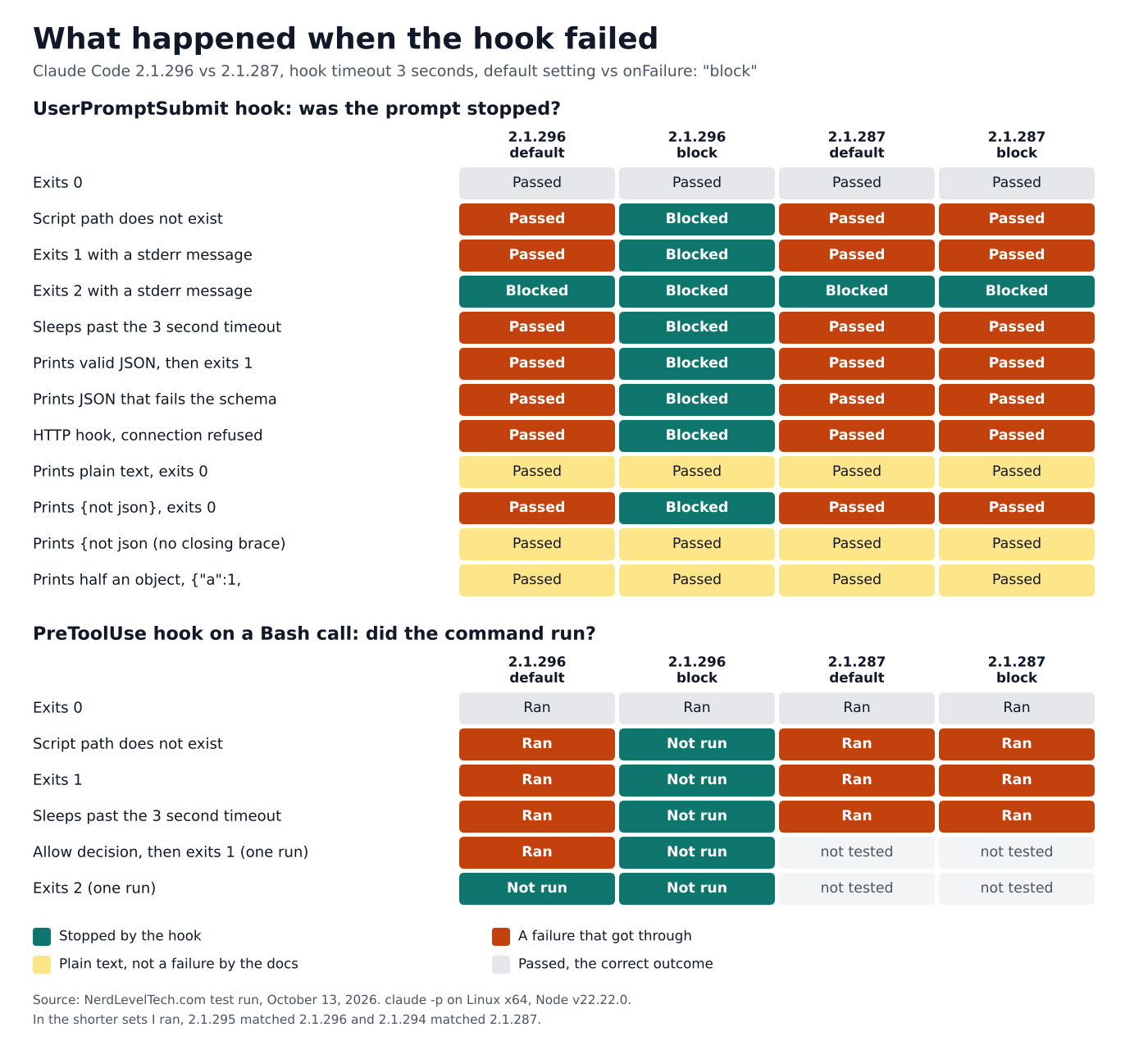
Cells are transcribed from the saved output of my test runs on October 13, 2026, and checked against it. The cells marked "not tested" are cases I did not run on 2.1.287. Builds 2.1.295 and 2.1.294 ran shorter sets and matched 2.1.296 and 2.1.287.
Results: UserPromptSubmit hooks
A UserPromptSubmit hook is the quickest way to see the field work, since a blocked prompt stops before the model answers. "Passed" means the model answered. "Blocked" means the hook stopped the prompt.
| Hook behavior | 2.1.296 default | 2.1.296 block | 2.1.287 default | 2.1.287 block |
|---|---|---|---|---|
| Exits 0 | Passed | Passed | Passed | Passed |
| Script path does not exist | Passed | Blocked | Passed | Passed |
| Exits 1 with a stderr message | Passed | Blocked | Passed | Passed |
| Exits 2 with a stderr message | Blocked | Blocked | Blocked | Blocked |
| Sleeps past the 3 second timeout | Passed | Blocked | Passed | Passed |
| Prints valid JSON, then exits 1 | Passed | Blocked | Passed | Passed |
| Prints JSON that fails the schema, exits 0 | Passed | Blocked | Passed | Passed |
| HTTP hook, connection refused | Passed | Blocked | Passed | Passed |
| Prints plain text, exits 0 | Passed | Passed | Passed | Passed |
Prints {not json}, exits 0 | Passed | Blocked | Passed | Passed |
Prints {not json with no closing brace, exits 0 | Passed | Passed | Passed | Passed |
Prints half an object, {"a":1,, exits 0 | Passed | Passed | Passed | Passed |
The "valid JSON, then exit 1" row matches the docs. With block set, an exit code other than 0 or 2 counts as a failure even when the hook printed valid JSON.2
The Bash table below has the version that prints an allow decision.
The schema row used {"decision":"maybe"} and, in a second variant, an additionalContext value of 5. The hook outcome in the event stream was error in both, and both blocked under block.
The {not json} row is a parse failure rather than a schema failure. It also reported error and blocked.
Results: hooks on Bash tool calls
This is the case that decides whether a command runs. "Ran" means the marker file existed and the tool result was a success. "Not run" means no marker file and a tool result carrying the hook error.
| Hook behavior | 2.1.296 default | 2.1.296 block | 2.1.287 default | 2.1.287 block |
|---|---|---|---|---|
| Exits 0 | Ran | Ran | Ran | Ran |
| Script path does not exist | Ran | Not run | Ran | Ran |
| Exits 1 | Ran | Not run | Ran | Ran |
| Sleeps past the 3 second timeout | Ran | Not run | Ran | Ran |
| Prints an allow decision, then exits 1 (one run) | Ran | Not run | not tested | not tested |
| Exits 2 (one run) | Not run | Not run | not tested | not tested |
When it blocks, the error text is specific. For the missing script it read PreToolUse:Bash hook error: [node .../missing.js]: failed; blocking because onFailure is "block", followed by Node's own stack trace.
For the sleeping script the word failed was replaced by timed out. That is the wording the docs promise.2
The missing-script rows use node with a script path that does not exist, so Node starts and then exits with code 1. That matches the docs' own test, which leaves the script missing.2
The docs list a missing script or executable as examples of a hook that can't start.2 I also ran a nonexistent command path, on Bash only, one run each. Run through the shell, it exited with code 127.
For the nonexistent command path, the command was not run under block on 2.1.296 and 2.1.295, and it ran under block on 2.1.294 and 2.1.287. With the default setting on 2.1.296 it ran.
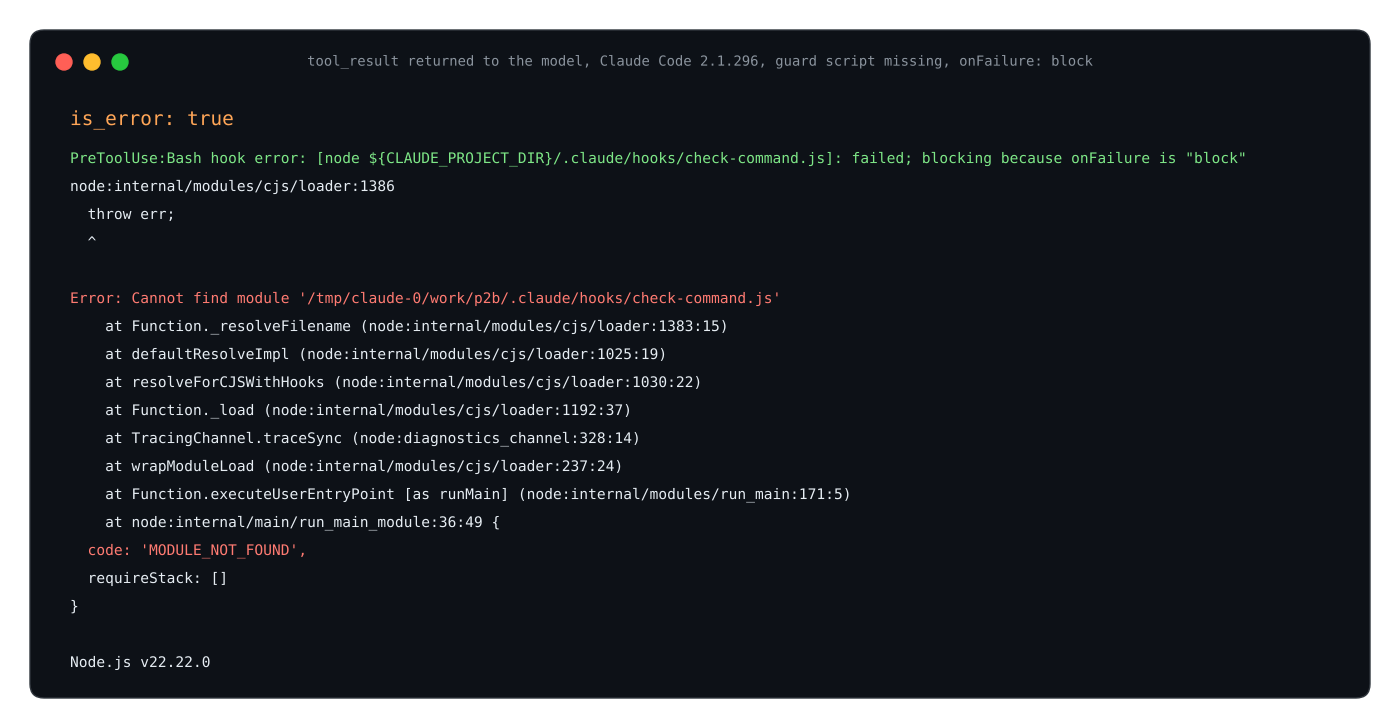
The tool_result text from a real run on October 13, 2026, rendered as an image from the captured output. The marker file was not created.
The version columns are the ones to take away. On 2.1.295, every case I ran matched 2.1.296.
In the 2.1.287 cases I ran, the block setting had no effect. In the Bash cases I re-ran on both older builds, the output never mentioned onFailure and stderr was empty.
On 2.1.294, the UserPromptSubmit cases for a missing script, exit 1, a timeout, a schema error, {not json} and a refused HTTP connection all passed with block set. Exit 2 still blocked. The Bash cases for a missing script, exit 1 and a timeout all ran.
If your team shares a settings file and some people are on an older build, such as the two I tested, the file looks safe there and is not.
Three behaviors worth knowing
JSON fragments count as plain text. The hooks reference says a non-async command hook's stdout is parsed as JSON when the whole output is a single JSON object.2 Output that does not start with {, or starts with { but does not end with }, is plain text.
Output that starts with { and ends with } but is not valid JSON is a parse failure.2
The docs add a separate rule for several lines that each parse as JSON on their own, which I did not test.2
My results follow the single-object rule on UserPromptSubmit. With block set on 2.1.296, {not json} was blocked in both of its runs. {not json passed in all five of its runs, and {"a":1, passed in both of its runs.
So a UserPromptSubmit hook that prints a fragment of its decision and still exits 0 gets through. That matches the documented rule, but it is easy to miss. Have the script exit non-zero on every error path, and let onFailure handle the rest.
A blocked prompt still exited 0 in my claude -p runs. When a UserPromptSubmit hook blocked a prompt, claude -p still exited with 0 in my check. That held for an exit 1 hook under block and for an exit 2 hook.
Classmethod's developer blog saw exit code 0 for a blocked prompt too, with an exit 1 hook, in its write-up of the same release.4 In CI, read the output rather than the exit status.
A default timeout can be long. The docs give 600 seconds as the default for command, HTTP and MCP tool hooks, lowered to 30 seconds on UserPromptSubmit and the two model-switch events, and to 10 on MessageDisplay.2 I set 3 seconds in the matrix and 5 seconds in the guard test below.
A guard script that fails closed
Here is a small PreToolUse guard. It denies rm -rf on purpose with exit 2 and lets everything else through. If its input is not valid JSON, the script throws and exits 1, and under block an exit 1 stops the call, as the tables above show.
let raw = "";
process.stdin.on("data", (chunk) => (raw += chunk));
process.stdin.on("end", () => {
  const input = JSON.parse(raw);
  const command = (input.tool_input && input.tool_input.command) || "";
  if (/\brm\s+-rf\b/.test(command)) {
    process.stderr.write("Blocked: rm -rf is not allowed here\n");
    process.exit(2);
  }
  process.exit(0);
});
The regex is a demo. It misses variants such as rm -fr and rm -r -f, so treat it as a starting point. Save it as .claude/hooks/check-command.js and point a project .claude/settings.json at it:
{
  "hooks": {
    "PreToolUse": [
      {
        "matcher": "Bash",
        "hooks": [
          {
            "type": "command",
            "command": "node",
            "args": ["${CLAUDE_PROJECT_DIR}/.claude/hooks/check-command.js"],
            "timeout": 5,
            "onFailure": "block"
          }
        ]
      }
    ]
  }
}
I ran both files on 2.1.296 in a fresh git folder. Fed directly through Node, ls exited 0, rm -rf build exited 2 with the message, and the text not json exited 1.
Through Claude Code, a touch command ran and an rm -rf command was blocked with the script's own message. With the script renamed away, the call was blocked with the failed; blocking because onFailure is "block" text.
When I changed "block" to "continue" and renamed the script away again, the touch ran. That is the fail-open default.
What onFailure does not cover
The docs say the field has no effect on Stop, SubagentStop, TaskCompleted and TeammateIdle hooks, because exit code 2 on those events sends Claude back to work and Claude cannot repair a hook that will not run. It also does nothing for background command hooks that set async or asyncRewake.2
The field tables list it for command and http hooks only, so prompt, agent and MCP tool hooks do not document such a switch.2
I did not test any of these. I also did not test PostToolUse, where the tool has already run by the time the hook fails, nor PermissionRequest, where the docs say a failure denies the request when block is set.2
Schema errors, malformed JSON and HTTP hooks were tested on UserPromptSubmit only, and the HTTP case was a refused connection, not a non-2xx response or a slow reply.
Exit code 1 and a 30 second sleep stand in for crashes and hangs. I did not test a killed process.
Everything here ran through claude -p against the CLI's default model on one platform, and I read the JSON event stream for most cases rather than the interactive interface. The results are a sample, not a guarantee.
A rollout checklist
Our read: treat this as a short checklist rather than a policy rewrite.
- Set
"onFailure": "block"on everyPreToolUseorUserPromptSubmitcommand or HTTP hook that denies something. - Keep exit code 2 for deliberate denials, and let
onFailurecover the cases where the hook itself breaks. - Set a
timeoutthat fits the hook. My guard ran under a 5 second timeout without trouble, far below the 600 second default. - Leave the script missing once, as the docs suggest, and confirm you see the
blocking because onFailuretext.2 - Pin a minimum version. The field needs 2.1.295 or later,2 and the two older builds I tested ignored it, with no mention of
onFailurein their Bash output. - Plan for the downside. A broken guard now blocks the calls it matches, so ship hook changes with a test, as you would any gate.
Why it matters in practice
Here is a real-world report. A GitHub issue opened on July 26, 2026 against Claude Code 2.1.220 reports 6,865 hook_non_blocking_error entries in one session, all with exit code 127.5
The reporter attributes it to an unquoted project path containing a space. They say eleven PreToolUse hooks were affected, and their breakdown lists twelve scripts, one of them named verify-on-stop.sh.5
They counted the entries in the session transcript file, and the issue title says there was no visible signal.5 That is one user's report, and I did not reproduce it.
The claudeissues.com mirror shows the issue closed as not planned on September 8, 2026.5 I did not check why it was closed.
If the report is accurate, it shows what fail-open looks like in practice. The guards are configured, the hooks fail to launch, and the only trace the reporter found was a record in the transcript file.
For the secrets-blocking pattern this protects, see our tested Claude Code mod that blocks .env reads. For the wider plugin risk, see Plugin4Shell and coding agent hardening.
For hooks that rewrite tool calls instead of blocking them, see our test of updatedInput validation in 2.1.300.
Bottom Line
A policy hook that fails open stops enforcing the moment it breaks. Since version 2.1.295, one setting covers command and HTTP hooks, with the exclusions listed above.
In my tests on 2.1.296 it held for a missing script, exit 1 and a timeout on both event types. On UserPromptSubmit it also held for schema errors, brace-wrapped invalid JSON and a refused HTTP connection.
Add it to every PreToolUse or UserPromptSubmit command or HTTP hook that denies, pin the version, and test the failure path once.
One blind spot follows from the documented parsing rule, and it held up in my test: a JSON fragment counts as plain text, so have the script exit non-zero on every error path.
References
Frequently Asked Questions
What does onFailure "block" do in Claude Code?
It makes a failing command or HTTP hook block the action instead of letting it proceed. A hook that can't start, times out, exits with a code other than 0 or 2, returns an HTTP error, or produces output that cannot be parsed or breaks the schema counts as failed. Plain-text stdout from a command hook is not a failure. The default is "continue".
Which Claude Code version added onFailure?
Version 2.1.295, released October 8, 2026. In my tests, 2.1.295 honored the setting, while 2.1.294 and 2.1.287 ignored it.
Does exit code 1 block a hook?
Not by default. The docs call exit code 1 without valid JSON a non-blocking error and recommend exit 2 for policy hooks. I saw the same on 2.1.296: an exit 1 hook let both a prompt and a Bash command through until I added onFailure: "block".
Does onFailure work on prompt, agent or MCP tool hooks?
The docs' field tables list it for command and HTTP hooks only. I did not test the other types.
Does onFailure affect Stop hooks?
According to the docs, no. They say it has no effect on Stop, SubagentStop, TaskCompleted and TeammateIdle hooks, or on background command hooks. I did not test these.
How do I check that my hook fails closed?
Move or rename the script, ask Claude to run a harmless Bash command, and look for failed; blocking because onFailure is "block" in the error, as the docs suggest. Then restore the script and confirm the command runs.
Does invalid JSON output count as a failure?
It depends on its shape. Per the docs, for a non-async command hook, output that starts with { and ends with } but is not valid JSON is a parse failure, and in my test {not json} blocked under block. Output that does not both start with { and end with } is plain text, and {not json and {"a":1, passed. The docs add a separate rule for several lines that each parse as JSON, which I did not test.
Does a blocked prompt change the exit code of claude -p?
In my check on 2.1.296 it stayed at 0, so a CI job should read the output text rather than the exit status.
Footnotes
-
Claude Code changelog, Anthropic, version 2.1.295, October 8, 2026. Source for the release date and the changelog wording. ↩ ↩2 ↩3
-
Hooks reference, Claude Code documentation, Anthropic, read October 13, 2026. Source for the field values, failure definitions, exit code 2 behavior, exclusions, JSON parsing rule and timeout defaults. ↩ ↩2 ↩3 ↩4 ↩5 ↩6 ↩7 ↩8 ↩9 ↩10 ↩11 ↩12 ↩13 ↩14 ↩15 ↩16 ↩17 ↩18 ↩19 ↩20 ↩21 ↩22 ↩23 ↩24 ↩25 ↩26 ↩27
-
@anthropic-ai/claude-code on npm, npm registry publish times queried with
npm view, October 13, 2026. Source for the 2.1.287, 2.1.294, 2.1.295 and 2.1.296 publish dates. ↩ -
Major Updates in Claude Code v2.1.294~v2.1.295 - Addition of hooks onFailure: "block" and OSC 7501 Support, DevelopersIO by Classmethod, October 9, 2026. Source for the observation that
claude -pexited 0 for aUserPromptSubmithook that exits 1, both with and withoutonFailure: "block". ↩ -
Hook launch failures (exit 127) are silent and non-blocking: 6,865 skipped guardrail invocations in one session, with no visible signal, issue 81458 in the anthropics/claude-code repository on GitHub, with its em dash written as a colon. Source for the 6,865 count, the exit code, the unquoted path and the hook count, all the reporter's own. The opened and closing dates and the not-planned state were read on the claudeissues.com mirror. ↩ ↩2 ↩3 ↩4
Free newsletter
Stay on the Nerd Track
One email a week: a Thursday issue with one system teardown, three signals, one workflow, one job and one Arabic takeaway.