OpenAI Agents SDK 0.23: Tool Error Redaction Tested
I ran openai-agents 0.22.3 and 0.23.1 with a scripted model. The default tool error message no longer sends exception text to the model or to trace spans.

Table of contents
TL;DR: In openai-agents 0.22.3, a tool that raised an exception sent the full exception text back to the model and wrote it into the trace. In 0.23.1, the default handler returns a fixed message instead. I ran both versions with a scripted model and a fake database password to check.123
Your own failure_error_function is unchanged and still sees everything, and so does the trace span it produces. The same goes for failure_error_function=None. One side effect: for bad arguments the model no longer gets even the short "Invalid JSON input" note.3
OpenAI Agents SDK tool error handling: the short answer
A function tool is a Python function the model can call. When it raises, the SDK has to decide what the model sees next. The tools guide says failure_error_function "provides an error response to the LLM in case the tool call crashes."4
In 0.22.3 the default response included the exception message. In 0.23.1 it is the fixed text "An error occurred while running the tool. Please try again." and the trace span records "Tool execution failed. Error details are redacted."3
What you'll learn
- What the default tool error message contains in 0.22.3 and in 0.23.1
- How to reproduce the difference with a scripted model and no API key
- Which paths still expose the raw exception: a custom handler and
failure_error_function=None - Why bad-argument errors now carry no hint, and what that costs
- How
**kwargstools changed, and a tested handler you can copy
What changed between 0.22.3 and 0.23.1
The OpenAI Agents SDK for Python is published on PyPI as openai-agents. Version 0.22.3 was uploaded on September 17, 2026 (UTC). The next release on PyPI is 0.23.1, uploaded on October 2, 2026 (UTC). There is no 0.23.0 on PyPI.1
The 0.23.0 release was published on GitHub on October 2, 2026 (UTC), and its changelog heading is dated October 1. The 0.23.1 release notes say what that means for upgraders: "Users upgrading from 0.22.3 receive the 0.23.0 behavior changes as well as this patch."56
Two changes in the 0.23.0 changelog matter here. Pull request #5112 was merged on September 20, 2026, three days after 0.22.3. Its description says:2
Default failures now return a fixed message and redact exception details from error spans, including tool-local cancellation and malformed arguments.
Pull request #5174, merged on September 25, 2026, rejects flat extra keys on non-strict **kwargs tools instead of dropping them without a word.7
Reproduce it with a scripted model
You need Python 3.10 or newer and two virtual environments, one per version. ScriptedModel, function_call and assistant_message come from agents.testing, which exists in both versions. No API key is involved.3
python3 -m venv v0.22.3 && ./v0.22.3/bin/pip install openai-agents==0.22.3
python3 -m venv v0.23.1 && ./v0.23.1/bin/pip install openai-agents==0.23.1
./v0.22.3/bin/python matrix.py
./v0.23.1/bin/python matrix.py
Save this as matrix.py. Each case builds a tool, scripts the model to call it once, then reads back what the model was shown in the second turn, or records that the run raised instead. A trace processor collects every exported span so the script can search them for the fake password.3
import asyncio, json
import importlib.metadata as md
from agents import Agent, Runner, function_tool, set_trace_processors
from agents.tracing import TracingProcessor
from agents.testing import ScriptedModel, assistant_message, function_call

SECRET = "hunter2"


class Collect(TracingProcessor):
    def __init__(self): self.spans = []
    def on_trace_start(self, trace): pass
    def on_trace_end(self, trace): pass
    def on_span_start(self, span): pass
    def on_span_end(self, span): self.spans.append(span.export())
    def shutdown(self): pass
    def force_flush(self): pass


def shown_to_model(model):
    items = model.last_call.input
    return [i["output"] for i in items if isinstance(i, dict) and i.get("type") == "function_call_output"]


def lookup(account_id: str) -> str:
    raise ValueError(f"connect failed: postgres://admin:{SECRET}@db.internal/prod")


def add(a: int, b: int) -> int:
    return a + b


def kw(a: int, **kwargs) -> str:
    return f"a={a} kwargs={kwargs}"


async def run(fn, args, **tool_opts):
    col = Collect()
    set_trace_processors([col])
    tool = function_tool(fn, **tool_opts)
    model = ScriptedModel([
        [function_call(tool.name, args, call_id="c1")],
        [assistant_message("done")],
    ])
    try:
        await Runner.run(Agent(name="a", model=model, tools=[tool]), "go")
        seen = shown_to_model(model)[0]
    except Exception as e:
        seen = f"RAISED {type(e).__name__}"
    in_trace = SECRET in json.dumps(col.spans, default=str)
    return f"model saw: {seen!r} | secret in trace: {in_trace}"


async def main():
    print("openai-agents", md.version("openai-agents"))
    custom = lambda ctx, e: f"custom saw: {e}"
    print("1 tool raises         ", await run(lookup, {"account_id": "x"}))
    print("2 custom handler      ", await run(lookup, {"account_id": "x"}, failure_error_function=custom))
    print("3 handler = None      ", await run(lookup, {"account_id": "x"}, failure_error_function=None))
    print("4 bad JSON arguments  ", await run(add, '{"a": 1, "b": '))
    print("5 wrong argument type ", await run(add, {"a": "one", "b": 2}))
    print("6 extra field, add()  ", await run(add, {"a": 1, "b": 2, "c": 3}))
    print("7 **kwargs flat extra ", await run(kw, {"a": 1, "extra": "x"}, strict_mode=False))
    print("8 **kwargs nested     ", await run(kw, {"a": 1, "kwargs": {"extra": "x"}}, strict_mode=False))


asyncio.run(main())
Results: 0.22.3 vs 0.23.1
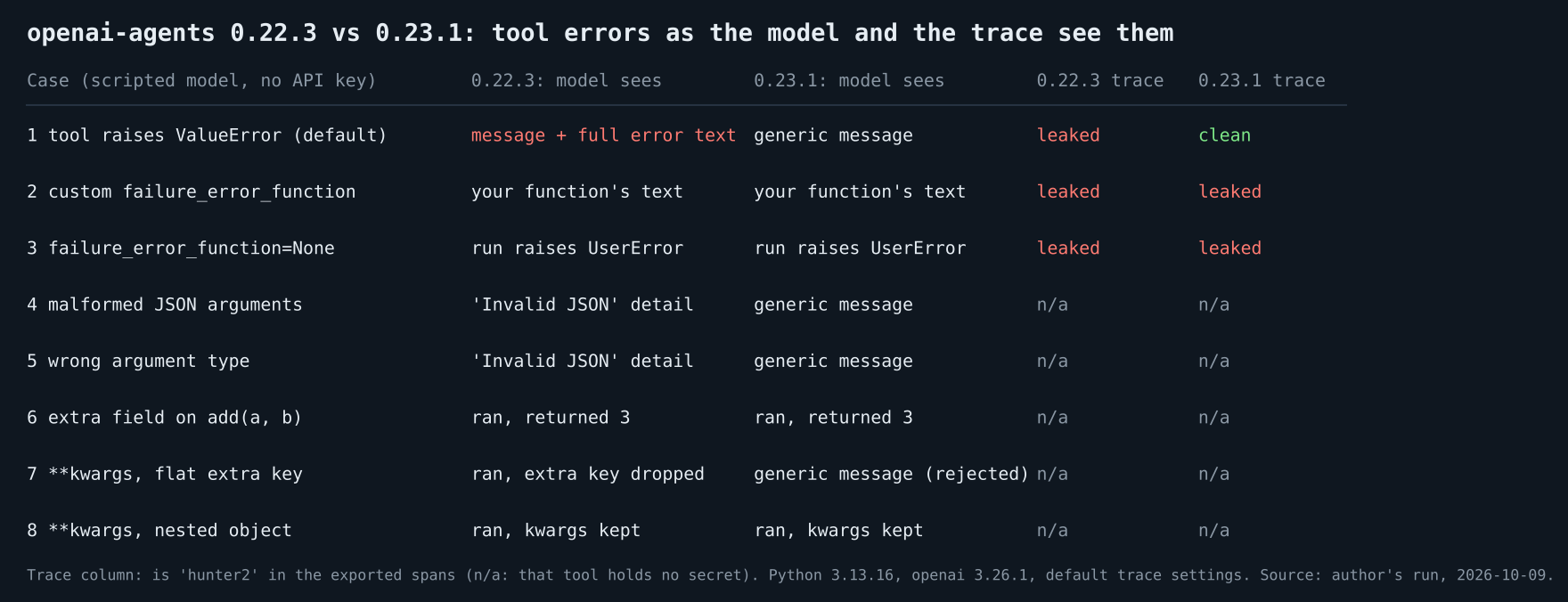
Output on 0.22.3:
openai-agents 0.22.3
1 tool raises          model saw: 'An error occurred while running the tool. Please try again. Error: connect failed: postgres://admin:hunter2@db.internal/prod' | secret in trace: True
2 custom handler       model saw: 'custom saw: connect failed: postgres://admin:hunter2@db.internal/prod' | secret in trace: True
3 handler = None       model saw: 'RAISED UserError' | secret in trace: True
4 bad JSON arguments   model saw: 'An error occurred while running the tool. Please try again. Error: Invalid JSON input for tool add' | secret in trace: False
5 wrong argument type  model saw: 'An error occurred while running the tool. Please try again. Error: Invalid JSON input for tool add' | secret in trace: False
6 extra field, add()   model saw: '3' | secret in trace: False
7 **kwargs flat extra  model saw: 'a=1 kwargs={}' | secret in trace: False
8 **kwargs nested      model saw: "a=1 kwargs={'extra': 'x'}" | secret in trace: False
Output on 0.23.1:
openai-agents 0.23.1
1 tool raises          model saw: 'An error occurred while running the tool. Please try again.' | secret in trace: False
2 custom handler       model saw: 'custom saw: connect failed: postgres://admin:hunter2@db.internal/prod' | secret in trace: True
3 handler = None       model saw: 'RAISED UserError' | secret in trace: True
4 bad JSON arguments   model saw: 'An error occurred while running the tool. Please try again.' | secret in trace: False
5 wrong argument type  model saw: 'An error occurred while running the tool. Please try again.' | secret in trace: False
6 extra field, add()   model saw: '3' | secret in trace: False
7 **kwargs flat extra  model saw: 'An error occurred while running the tool. Please try again.' | secret in trace: False
8 **kwargs nested      model saw: "a=1 kwargs={'extra': 'x'}" | secret in trace: False
I ran the script three times per version and the output was identical each time.3
The default message no longer carries the exception
Case 1 is the one that matters for secrets. The tool raises a ValueError whose message holds a database URL with a password. On 0.22.3 the model saw the full exception message and the trace span held it too. On 0.23.1 the model saw only the fixed message and the span read "Tool execution failed. Error details are redacted."3
Exception messages from database drivers, HTTP clients and file APIs can include connection strings, file paths or request details. Whatever the model sees can be repeated to the user, copied into a later tool call, or stored in a conversation history.
The 0.23.1 behavior held with default tracing settings. The tracing guide says that by default trace_include_sensitive_data is True, and the span was still redacted in my run.83
A custom handler still sees everything
Cases 2 and 3 did not change. A function you pass as failure_error_function receives the original exception, and whatever you return goes straight to the model. In case 2 the handler's text carried the full message to the model, and the trace held the password as well.3
Passing failure_error_function=None re-raises, as the tools guide describes.4 The run raised a UserError, so in case 3 the model saw nothing at all, and the trace contained the password on both versions.3
If you already wrote a handler that returns str(error), upgrading does not fix it for you. The new redaction only covers the default.
The span is a separate path from the model text. The handler section below shows that a custom handler which returns a safe string to the model still leaves the raw error in the span, unless you turn off trace_include_sensitive_data.
There is one more switch. Setting OPENAI_AGENTS_DONT_LOG_TOOL_DATA=0 on 0.23.1 made the SDK write the tool arguments, message and traceback to the local log. The text the model saw and the trace spans stayed redacted in that run.3 The configuration guide documents the variable and says setting it to 0 "can expose raw model or tool data in logs, exception messages, exception chains, and other diagnostic context." It recommends enabling it "only in a controlled development environment."9 Keep it off in production.
Bad arguments now get a generic message too
Cases 4 and 5 show the cost. On 0.22.3, malformed JSON and a wrong argument type both reached the model as "An error occurred while running the tool. Please try again. Error: Invalid JSON input for tool add". That says something is wrong with the arguments, but not what or which field. The SDK used the same wording for both cases. On 0.23.1 both come back as the same generic text with no reason.3
A message that only says "Please try again" gives the model nothing to correct against. I used a scripted model, so I cannot say how often a real model recovers, and I did not measure it.
One more caveat. The 0.22.3 source has a second default branch for malformed JSON that adds "Please try again with valid JSON" and the decoder's message. It did not fire in my runs. The configuration guide explains why: "with tool-data redaction enabled, invalid arguments for a FunctionTool raise a generic ModelBehaviorError without chaining the underlying validation error."9 I walked the exception's cause chain with a short script on both versions and found only the ModelBehaviorError itself.3 Other call paths may behave differently.
If you want the model to get a hint, write a handler that decides what to say per error type. The handler section below has one.
A **kwargs tool rejects flat extra keys
A non-strict tool with **kwargs advertises one nested object called kwargs. On 0.22.3, a model that sent {"a": 1, "extra": "x"} got a successful run with kwargs={}: the extra key was dropped silently. On 0.23.1 the call fails with the generic error (case 7), and the pull request says the keys are rejected before invocation.73
Pull request #5174 describes the same bug: "Pydantic discarded unexpected top-level keys and the function ran with missing arguments."7 The nested form {"a": 1, "kwargs": {"extra": "x"}} worked on both versions (case 8). A plain tool such as add() still ignores an unknown top-level key on both versions (case 6). The pull request is about **kwargs tools only.73
A strict tool with **kwargs fails when you define it, on both versions. On 0.22.3 the UserError was about additionalProperties. On 0.23.1 it says to set strict_mode=False or use explicit parameters.3
from agents import function_tool


def kw(a: int, **kwargs) -> str:
    return ""


try:
    function_tool(kw)
except Exception as e:
    print(type(e).__name__, e)
Output on 0.22.3, then on 0.23.1 (one line each):
UserError additionalProperties should not be set for object types. This could be because you're using an older version of Pydantic, or because you configured additional properties to be allowed. If you really need this, update the function or output tool to not use a strict schema.
UserError Variadic keyword parameter `**kwargs` in function kw cannot use a strict schema. Set strict_mode=False on the function tool (or strict_json_schema=False on function_schema) and pass keyword arguments in the nested `kwargs` object, or use explicit parameters for a strict tool.
A failure handler for what the model sees
This handler allows one exception class to speak to the model, gives malformed arguments a fixed hint, and hides everything else from the model. It logs the raw error on your side, where you can scrub it. The script runs every case twice, once with the default trace_include_sensitive_data and once with it set to False.3
import asyncio, json, logging, sys
from agents import Agent, RunConfig, Runner, function_tool, set_trace_processors
from agents.exceptions import ModelBehaviorError
from agents.tracing import TracingProcessor
from agents.testing import ScriptedModel, assistant_message, function_call

log = logging.getLogger("tool-errors")
logging.basicConfig(level=logging.ERROR, format="server log: %(message)s", stream=sys.stdout)


class Collect(TracingProcessor):
    def __init__(self): self.spans = []
    def on_trace_start(self, trace): pass
    def on_trace_end(self, trace): pass
    def on_span_start(self, span): pass
    def on_span_end(self, span): self.spans.append(span.export())
    def shutdown(self): pass
    def force_flush(self): pass


class SafeToolError(Exception):
    """Messages on this class are written for the model and safe to show."""


def failure_handler(ctx, error):
    log.error("%s: %s", type(error).__name__, error)
    if isinstance(error, SafeToolError):
        return f"Tool failed: {error}"
    if isinstance(error, ModelBehaviorError):
        return "Your arguments did not match the tool schema. Send valid JSON with the listed fields."
    return "Tool failed for an internal reason. Do not retry with the same input."


def lookup(account_id: str) -> str:
    if account_id == "x":
        raise SafeToolError("account x is archived, use an active id")
    raise ValueError("connect failed: postgres://admin:hunter2@db.internal/prod")


async def call(args, sensitive):
    col = Collect()
    set_trace_processors([col])
    tool = function_tool(lookup, failure_error_function=failure_handler)
    model = ScriptedModel([[function_call("lookup", args, call_id="c1")], [assistant_message("done")]])
    cfg = RunConfig(trace_include_sensitive_data=sensitive)
    await Runner.run(Agent(name="a", model=model, tools=[tool]), "go", run_config=cfg)
    seen = [i["output"] for i in model.last_call.input if isinstance(i, dict) and i.get("type") == "function_call_output"][0]
    return f"model saw: {seen} | secret in trace: {'hunter2' in json.dumps(col.spans, default=str)}"


async def main():
    for sensitive in (True, False):
        print(f"trace_include_sensitive_data={sensitive}")
        print(await call({"account_id": "x"}, sensitive))
        print(await call({"account_id": "y"}, sensitive))
        print(await call('{"account_id": ', sensitive))


asyncio.run(main())
Output, identical on 0.22.3 and 0.23.1:
trace_include_sensitive_data=True
server log: SafeToolError: account x is archived, use an active id
model saw: Tool failed: account x is archived, use an active id | secret in trace: False
server log: ValueError: connect failed: postgres://admin:hunter2@db.internal/prod
model saw: Tool failed for an internal reason. Do not retry with the same input. | secret in trace: True
server log: ModelBehaviorError: Invalid JSON input for tool lookup
model saw: Your arguments did not match the tool schema. Send valid JSON with the listed fields. | secret in trace: False
trace_include_sensitive_data=False
server log: SafeToolError: account x is archived, use an active id
model saw: Tool failed: account x is archived, use an active id | secret in trace: False
server log: ValueError: connect failed: postgres://admin:hunter2@db.internal/prod
model saw: Tool failed for an internal reason. Do not retry with the same input. | secret in trace: False
server log: ModelBehaviorError: Invalid JSON input for tool lookup
model saw: Your arguments did not match the tool schema. Send valid JSON with the listed fields. | secret in trace: False
The handler does its job for the model: only the SafeToolError text got through. Two things it does not do. The server log lines still contain the password. And in the default run the trace span held the password for the ValueError case on both versions. 0.22.3 records the raw exception in the span for every handler, and 0.23.1 drops it only for the default handler.3 Setting trace_include_sensitive_data=False removed it in my run. The tracing guide says generation spans and function spans store inputs and outputs, and that you can disable capturing that data with the same setting.8 Scrub or restrict the log, and decide which trace setting you want.
What I did not test
I used a scripted model, so nothing here says how a real model reacts to the generic message. I ran Python 3.13.16 on Linux with openai 3.26.1 and did not try other Python versions.3
I did not test streaming runs, MCP tools, hosted tools, handoffs or approval flows. The 0.23.0 changelog lists many other changes, among them per-agent approval scoping, sandbox options and an encrypted history scan budget. I tested none of them.5 If you run approvals, my needsApproval test on the JavaScript SDK covers that SDK's approval callback, and the human-in-the-loop tutorial covers approval flows in the Claude Agent SDK.
Upgrade checklist
- Search your tools for
failure_error_functionand for any handler that returnsstr(error). - Decide which exception types may reach the model, and return a fixed string for the rest.
- Add a hint for
ModelBehaviorErrorso the model at least learns that its arguments were wrong. - Check any non-strict
**kwargstool for models that send extra keys at the top level. - Check your trace backend for spans exported before the upgrade, since 0.22.3 put error text in them.
- If you use a custom handler, decide whether raw errors may sit in your trace spans, and set
trace_include_sensitive_datato match. - Pin
openai-agentsto a version you tested, and rerunmatrix.pyafter each upgrade.
For wider guardrail patterns, see AI agent reliability, verification loops and guardrails.
Bottom line
On 0.22.3, a failing tool could put its exception text in front of the model and into the spans the SDK exports. On 0.23.1 the default handler stops doing that.
Custom handlers, failure_error_function=None, the trace setting and the cost of a hint-free error message are still your decisions. Test them with a scripted model before you upgrade.
Frequently Asked Questions
What does the default tool error message say in openai-agents 0.23.1?
It returns "An error occurred while running the tool. Please try again." with no exception text. I saw that string in the model input for a raised ValueError, for malformed JSON and for a wrong argument type.
Does a custom failure_error_function still receive the raw exception?
Yes. In the handler example above, its log shows the original ValueError and, for malformed JSON, a ModelBehaviorError, on both versions. Whatever it returns goes to the model, so it needs its own filtering.
How do I give the model a useful error without leaking secrets?
Write a handler that returns text only for exception classes you control, gives malformed arguments a fixed hint, and logs the raw error on your side. The example above does that for the model-facing text. It does not clear the trace span, which needs trace_include_sensitive_data=False.
Is there an openai-agents 0.23.0 on PyPI?
No. PyPI lists 0.22.3 and then 0.23.1, uploaded on October 2, 2026. The 0.23.0 changes ship inside 0.23.1.
Do I need an OpenAI API key to reproduce this?
No. ScriptedModel in agents.testing replaces the model, and every case ran offline. The scripts also replace the SDK's trace processors with a local one, so nothing is exported.
Footnotes
-
PyPI, openai-agents, release metadata read through the PyPI JSON API on October 9, 2026: 0.22.3 uploaded 2026-09-17 and 0.23.1 uploaded 2026-10-02, with no 0.23.0 in the release list.
pip download openai-agents==0.23.0also found no matching distribution. ↩ ↩2 ↩3 -
openai/openai-agents-python, pull request #5112, "fix(tools): redact default tool failure details", merged 2026-09-20. The quoted sentence is from the description. ↩ ↩2
-
Author's measurement, October 9, 2026: Python 3.13.16 on Linux,
openai3.26.1,openai-agents0.22.3 and 0.23.1 in separate virtual environments,ScriptedModelfromagents.testing, no API key. Every script in this post was extracted from the finished article and rerun, and the output blocks match. The matrix output was identical across three runs per version. The cause-chain check mentioned above is a separate short script that is not shown, and so is the run that printed the exported span's error field to read its exact text. Statements about branches inside the default handler and the span logic come from reading the installed source fileagents/tool.pyin each version. ↩ ↩2 ↩3 ↩4 ↩5 ↩6 ↩7 ↩8 ↩9 ↩10 ↩11 ↩12 ↩13 ↩14 ↩15 ↩16 ↩17 ↩18 ↩19 ↩20 ↩21 ↩22 ↩23 -
OpenAI Agents SDK, Tools guide, section "Handling errors in function tools". Quote and the
Nonebehavior taken on October 9, 2026 from the guide's source file,docs/tools.mdon the main branch. ↩ ↩2 -
openai/openai-agents-python GitHub releases, v0.23.0, published 2026-10-02 UTC with a changelog heading of 2026-10-01. The list includes #5112 and #5174 (bug fixes), #5144 (approval scoping), and the features #5116 (sandbox), #5118 (encrypted history scan budget) and #5135 (sandbox). ↩ ↩2
-
openai/openai-agents-python GitHub releases, v0.23.1, published 2026-10-02. The quoted sentence is from the release readiness review in the release notes, which also says PyPI had neither 0.23.0 nor 0.23.1 when the review was written. ↩ ↩2
-
openai/openai-agents-python, pull request #5174, "fix(core): reject silently discarded kwargs tool arguments", merged 2026-09-25. The quoted words are from the summary. ↩ ↩2 ↩3 ↩4
-
OpenAI Agents SDK, Tracing guide, section "Sensitive data": "By default,
trace_include_sensitive_dataisTrue." The same section says: "Thegeneration_span()stores the inputs/outputs of the LLM generation, andfunction_span()stores the inputs/outputs of function calls. These may contain sensitive data, so you can disable capturing that data via" theRunConfig.trace_include_sensitive_datasetting. Taken fromdocs/tracing.mdon the main branch on October 9, 2026. ↩ ↩2 ↩3 -
OpenAI Agents SDK, Configuration guide, section "Sensitive data in logs and diagnostics". Quotes checked on October 9, 2026 against the guide's source file,
docs/config.md, in a clone of the main branch at commit 125efa0 (2026-10-08). ↩ ↩2
Free newsletter
Stay on the Nerd Track
One email a week: a Thursday issue with one system teardown, three signals, one workflow, one job and one Arabic takeaway.