MCP Token Audience Check: expectedResource Tested (2026)
I tested the MCP TypeScript SDK's new expectedResource option for token audience validation. It is off by default and Express adapter 2.0.1 ignores it (2026).

Table of contents
TL;DR: MCP token audience validation is the check that an access token was issued for your MCP server and not for some other service. The TypeScript SDK added an option for it on October 2, 2026, and it is off until you set it.1
In my tests on SDK 1.32.1, a token issued for a different server got HTTP 200 until I set expectedResource, and HTTP 401 after.2 On @modelcontextprotocol/express 2.0.1, installed next to server 2.3.1, the option did nothing at all.2
MCP token audience validation: the short answer
A protected MCP server acts as an OAuth resource server. The spec says it must only accept tokens issued for it, so a token minted for another API cannot be replayed against it.3
In the TypeScript SDK, requireBearerAuth gets this check through expectedResource. You set it to the value your authorization server puts into tokens meant for your server, and your verifier must report that value back as AuthInfo.resource.4 In the SDK's types, both are URL objects.52
What you'll learn
- What the MCP spec requires of a server about token audience
- What changed in the TypeScript SDK on October 2, 2026
- A small rig that tests ten token shapes against the guard
- How
expectedResourcecompares values, including slashes, fragments and case - Why a verifier that forgets
resourcelocks every user out - Why the Express adapter version matters
- A copy-paste setup and a checklist
What the MCP spec says about token audience
The 2026-07-28 authorization page says servers "MUST validate that access tokens were issued specifically for them as the intended audience," according to RFC 8707 Section 2.3 The MCP versioning page lists 2026-07-28 as the current revision.6
The security page repeats it as a rule about "Access Token Privilege Restriction": servers must reject tokens that do not include them in the audience claim, or otherwise verify they are the intended recipient.3
RFC 8707, published in February 2020, defines the resource request parameter that lets a client tell the authorization server which resource it wants a token for.7
The spec also forbids passthrough. If your MCP server calls an upstream API, the security page says it "MUST NOT pass through the token it received from the MCP client."3
What changed in the TypeScript SDK on October 2
The v1 line shipped @modelcontextprotocol/sdk 1.32.0 on October 2, 2026. The v2 line shipped @modelcontextprotocol/server 2.3.0 the same day.1
The 1.32.0 release notes list two new options, "both off unless you set them." One is maxToolInputElements. The other is expectedResource on requireBearerAuth, which "accepts only tokens issued for this server (the token's audience)." The 2.3.0 notes list the same two options as minor changes, and say that with expectedResource unset, nothing changes.1
The pull request that added it to v2 was merged on October 2, and it says the comparison runs before the scope and expiry checks.5 The bearerAuth.js file in the installed 1.32.1 package agrees: the audience check comes first.2
On October 5 the project shipped 1.32.1 and 2.3.1. The 2.3.1 notes add the same option to @modelcontextprotocol/server-legacy.1
Build a token audience test rig
I did not want to trust a changelog, so I built a fake authorization server and a guard. It has ten tokens, each with a different audience shape, including one with no aud claim at all.2
The verifier picks the aud entry on this server's host and returns it as resource. That mirrors the pattern in the SDK docs, which report "this server's entry" from aud and leave resource unset when there is none.4
// tokens.mjs: a fake authorization server. Opaque token -> claims (stands in for a JWT's `aud`).
export const SERVER_URL = new URL('https://mcp.example.com/mcp');
const exp = Math.floor(Date.now() / 1000) + 3600;

export const CLAIMS = {
  'tok-ours':      { aud: 'https://mcp.example.com/mcp', exp },
  'tok-other':     { aud: 'https://other.example.org/mcp', exp },   // issued for a different server
  'tok-no-aud':    { exp },                                          // no audience at all
  'tok-trailing':  { aud: 'https://mcp.example.com/mcp/', exp },     // one trailing slash
  'tok-fragment':  { aud: 'https://mcp.example.com/mcp#x', exp },    // fragment
  'tok-two-slash': { aud: 'https://mcp.example.com/mcp//', exp },    // two trailing slashes
  'tok-origin':    { aud: 'https://mcp.example.com', exp },          // origin only, no path
  'tok-http':      { aud: 'http://mcp.example.com/mcp', exp },       // wrong scheme
  'tok-upper':     { aud: 'HTTPS://MCP.EXAMPLE.COM/mcp', exp },      // uppercase scheme and host
  'tok-list':      { aud: ['https://other.example.org/mcp', 'https://mcp.example.com/mcp'], exp }, // array
};

// mode: 'url' reports `resource` as a URL object, which the SDK types require and its docs use.
// 'string' reports a plain string: only plain JavaScript allows that. 'none' reports no `resource`.
export function makeVerifier({ mode = 'string' } = {}) {
  return {
    async verifyAccessToken(token) {
      const c = CLAIMS[token];
      if (!c) throw new Error('unknown token');
      const auds = [c.aud ?? []].flat();
      const hit = auds.find(a => { try { return new URL(a).host === 'mcp.example.com'; } catch { return false; } });
      const info = { token, clientId: 'client-1', scopes: ['mcp'], expiresAt: c.exp };
      if (mode === 'string' && hit) info.resource = hit;
      if (mode === 'url' && hit) info.resource = new URL(hit);
      return info;
    },
  };
}
The second file starts two Express apps, one without the option and one with it. It sends every token to each, plus one request with no Authorization header, and prints the status codes.
// matrix.mjs: node matrix.mjs string | node matrix.mjs url | node matrix.mjs none | node matrix.mjs url origin
import express from 'express';
import { requireBearerAuth } from '@modelcontextprotocol/sdk/server/auth/middleware/bearerAuth.js';
import { CLAIMS, SERVER_URL, makeVerifier } from './tokens.mjs';

const mode = process.argv[2] ?? 'string';
const expected = process.argv[3] === 'origin' ? new URL('https://mcp.example.com') : SERVER_URL;

async function statuses(expectedResource) {
  const app = express();
  const guard = requireBearerAuth({ verifier: makeVerifier({ mode }), requiredScopes: ['mcp'], expectedResource });
  app.post('/mcp', guard, (req, res) => res.json({ ok: true }));
  const server = await new Promise(r => { const s = app.listen(0, '127.0.0.1', () => r(s)); });
  const url = `http://127.0.0.1:${server.address().port}/mcp`;
  const out = {};
  for (const t of Object.keys(CLAIMS)) {
    out[t] = (await fetch(url, { method: 'POST', headers: { authorization: `Bearer ${t}` } })).status;
  }
  out['(no header)'] = (await fetch(url, { method: 'POST' })).status;
  server.close();
  return out;
}

const off = await statuses(undefined);
const on = await statuses(expected);
console.log('token'.padEnd(14), 'no option', 'expectedResource');
for (const t of Object.keys(off)) console.log(t.padEnd(14), String(off[t]).padEnd(9), on[t]);
Install and run it in an empty folder with "type": "module" in package.json:
npm i @modelcontextprotocol/sdk@1.32.1 express@5
node matrix.mjs string
Results: a token for another server gets HTTP 200 until you opt in
This is the output on SDK 1.32.1 with a verifier that returns resource as a string, which only plain JavaScript allows:2
token          no option expectedResource
tok-ours       200       200
tok-other      200       401
tok-no-aud     200       401
tok-trailing   200       200
tok-fragment   200       200
tok-two-slash  200       401
tok-origin     200       401
tok-http       200       401
tok-upper      200       401
tok-list       200       200
(no header)    401       401
Without the option, all ten tokens got 200, including tok-other and tok-no-aud. With it, six were rejected.2 In the SDK's own guard, MCP token audience validation does not happen until you set expectedResource.
The last row sends no Authorization header at all. It got 401 in both columns, so the guard still demands a token.2
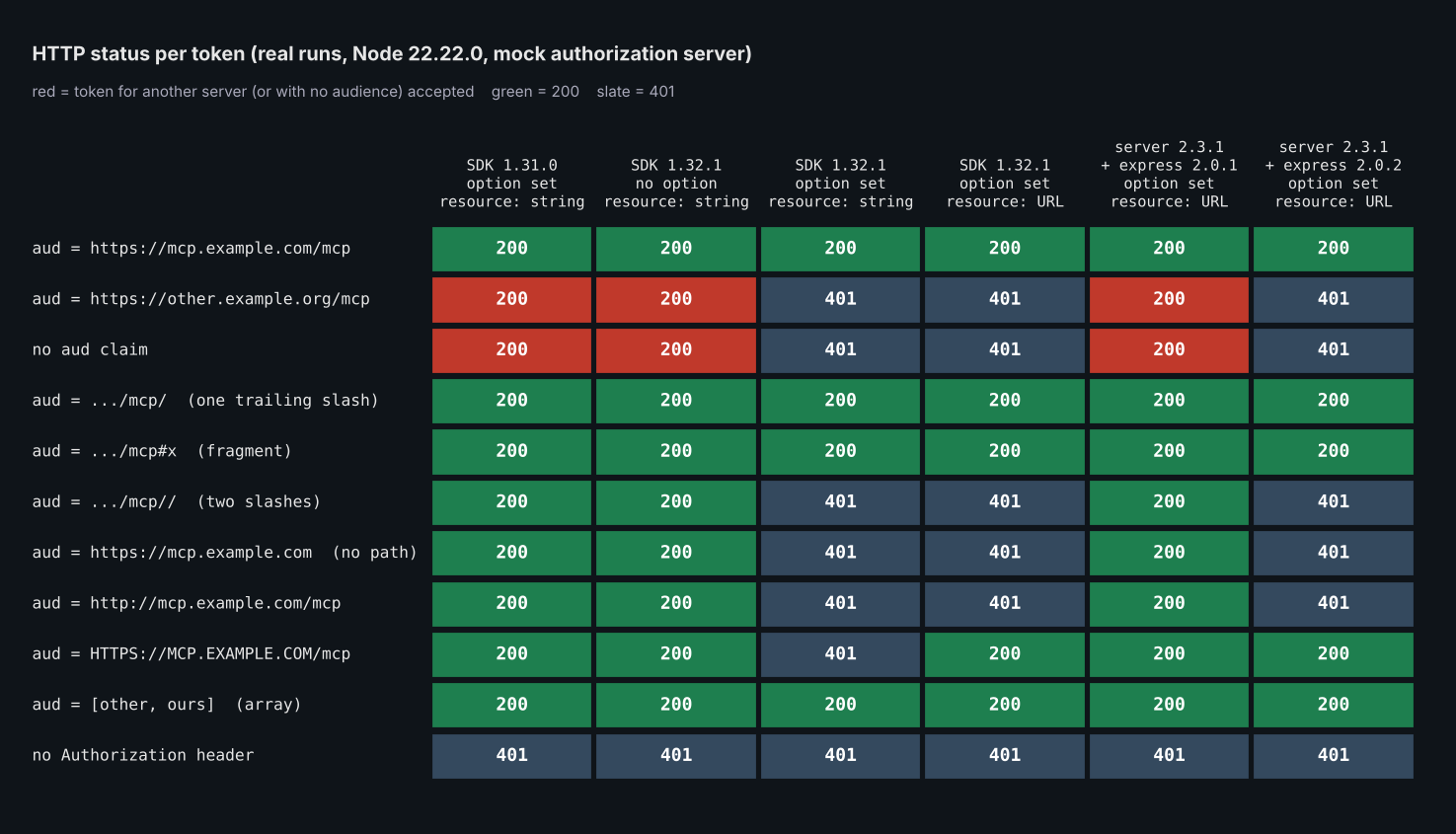 Figure 1: Status codes from my runs. Red cells are tokens for another server, or with no audience, that were accepted. Columns 1 to 3 used a verifier that returns
 resource as a string, columns 4 to 6 used a URL object.
requireBearerAuth expectedResource: what it accepts and rejects
The SDK compares expectedResource with the resource your verifier reports as strings, ignoring a fragment and one trailing slash.15 My results are consistent with that.
Here is what the ten tokens showed:
- Exact match, one trailing slash, a fragment: accepted (3 of 3).
- Array
audwith our entry in it: accepted, because my verifier picked the right entry before the guard saw it. - Two trailing slashes: rejected. Only one slash is ignored.
- Origin only (
https://mcp.example.com): rejected, because it differs fromhttps://mcp.example.com/mcp. http://instead ofhttps://: rejected.
The origin-only case matters. The spec lists https://mcp.example.com as a valid canonical URI for a server.8 The option takes one value, so it must equal what your authorization server issues. With expectedResource set to new URL('https://mcp.example.com') (node matrix.mjs url origin), only tok-origin passed and tok-ours got 401.2
Why an uppercase audience fails with a string resource
The spec's canonical form is lowercase, but it says implementations "SHOULD accept uppercase scheme and host components for robustness and interoperability."8
The guard compares serialized strings. A string HTTPS://MCP.EXAMPLE.COM/mcp does not equal the lowercase expected value, so it was rejected in plain JavaScript.2
A URL object serializes in normalized lowercase, so the same audience passed. Run node matrix.mjs url to see tok-upper flip from 401 to 200.2
Typed code does not normally hit the string case. AuthInfo.resource is a URL, and the TypeScript compiler rejected a string resource in my check.2 Use new URL(...) when you fill it, as the docs example does.4
A verifier that forgets resource locks everyone out
If you set expectedResource and your verifier never sets AuthInfo.resource, the guard has nothing to compare. In my run, node matrix.mjs none rejected all ten tokens with 401, including tok-ours.2
That fails closed, which is the safe direction. The docs also state the other case: "When expectedResource is not set, AuthInfo.resource is not compared with anything."4
The SDK does not read the aud claim for you. Your verifier does that and reports the result.42
Express adapter 2.0.1 silently ignores expectedResource
In v2, the Express middleware lives in its own package, @modelcontextprotocol/express. The 2.3.0 release notes say 2.0.1 "does not pass the option on, so nothing is compared." The fix is the 2.0.2 adapter, published the same day as server 2.3.0.41
I tested it with the same fake server and the same guard options:2
// v2check.mjs: does the Express adapter actually enforce expectedResource?
import express from 'express';
import { readFileSync } from 'node:fs';
import { requireBearerAuth } from '@modelcontextprotocol/express';
import { SERVER_URL, makeVerifier } from './tokens.mjs';

const version = JSON.parse(readFileSync(new URL('./node_modules/@modelcontextprotocol/express/package.json', import.meta.url))).version;
const app = express();
const guard = requireBearerAuth({ verifier: makeVerifier({ mode: 'url' }), requiredScopes: ['mcp'], expectedResource: SERVER_URL });
app.post('/mcp', guard, (req, res) => res.json({ ok: true }));
const server = await new Promise(r => { const s = app.listen(0, '127.0.0.1', () => r(s)); });

for (const token of ['tok-ours', 'tok-other', 'tok-no-aud']) {
  const r = await fetch(`http://127.0.0.1:${server.address().port}/mcp`, { method: 'POST', headers: { authorization: `Bearer ${token}` } });
  console.log(`@modelcontextprotocol/express ${version}`, token.padEnd(10), r.status);
}
server.close();
With @modelcontextprotocol/server 2.3.1 installed next to each adapter version, I got this:2
@modelcontextprotocol/express 2.0.1 tok-ours   200
@modelcontextprotocol/express 2.0.1 tok-other  200
@modelcontextprotocol/express 2.0.1 tok-no-aud 200
@modelcontextprotocol/express 2.0.2 tok-ours   200
@modelcontextprotocol/express 2.0.2 tok-other  401
@modelcontextprotocol/express 2.0.2 tok-no-aud 401
Install both together: npm i @modelcontextprotocol/server@2.3.1 @modelcontextprotocol/express@2.0.2.
I also type-checked short calls with TypeScript 5.9.3. On 2.0.1 the compiler reported that expectedResource does not exist in type BearerAuthOptions (TS2353). On 2.0.2 it accepted a URL and rejected a string (TS2322).2 Plain JavaScript gives no warning, so a 2.0.1 install silently skips the check.
The same silent pass happened on v1. Install @modelcontextprotocol/sdk@1.31.0 and run the same matrix.mjs: the expectedResource column returns 200 for all ten tokens. If a lockfile pins 1.31.0, the option does nothing in plain JavaScript even when your code sets it, so check the installed version for MCP token audience validation.2
End to end: a real MCP client with a token for another server
The status codes come from a plain route. To make sure the behavior holds through the SDK's own client and a real tool call, I mounted a one-tool McpServer behind the guard on SDK 1.32.1.2
// e2e.mjs
import express from 'express';
import { McpServer } from '@modelcontextprotocol/sdk/server/mcp.js';
import { StreamableHTTPServerTransport } from '@modelcontextprotocol/sdk/server/streamableHttp.js';
import { Client } from '@modelcontextprotocol/sdk/client/index.js';
import { StreamableHTTPClientTransport } from '@modelcontextprotocol/sdk/client/streamableHttp.js';
import { requireBearerAuth } from '@modelcontextprotocol/sdk/server/auth/middleware/bearerAuth.js';
import { makeVerifier, SERVER_URL } from './tokens.mjs';

async function start(expectedResource) {
  const app = express();
  app.use(express.json());
  const guard = requireBearerAuth({ verifier: makeVerifier({ mode: 'url' }), requiredScopes: ['mcp'], expectedResource,
    resourceMetadataUrl: 'https://mcp.example.com/.well-known/oauth-protected-resource/mcp' });
  app.post('/mcp', guard, async (req, res) => {
    const server = new McpServer({ name: 'demo', version: '1.0.0' });
    server.registerTool('read_notes', { description: 'Read private notes', inputSchema: {} },
      async () => ({ content: [{ type: 'text', text: `notes for ${req.auth.clientId}` }] }));
    const transport = new StreamableHTTPServerTransport({ sessionIdGenerator: undefined });
    res.on('close', () => { transport.close(); server.close(); });
    await server.connect(transport);
    await transport.handleRequest(req, res, req.body);
  });
  const s = await new Promise(r => { const x = app.listen(0, '127.0.0.1', () => r(x)); });
  return { s, url: new URL(`http://127.0.0.1:${s.address().port}/mcp`) };
}

async function call(url, token) {
  const client = new Client({ name: 'c', version: '1.0.0' });
  const t = new StreamableHTTPClientTransport(url, { requestInit: { headers: { Authorization: `Bearer ${token}` } } });
  try {
    await client.connect(t);
    const r = await client.callTool({ name: 'read_notes', arguments: {} });
    return 'OK: ' + r.content[0].text;
  } catch (e) { return 'ERR: ' + String(e.message).slice(0, 140).replace(/\n/g, ' '); }
  finally { await client.close().catch(() => {}); }
}

for (const [label, er] of [['without expectedResource', undefined], ['with expectedResource', SERVER_URL]]) {
  const { s, url } = await start(er);
  console.log(`--- ${label}`);
  for (const tok of ['tok-ours', 'tok-other']) console.log(tok.padEnd(10), await call(url, tok));
  if (er) {
    const r = await fetch(url, { method: 'POST', headers: { authorization: 'Bearer tok-other', 'content-type': 'application/json' }, body: '{}' });
    console.log('HTTP', r.status, '| WWW-Authenticate:', r.headers.get('www-authenticate'));
  }
  s.close();
}
The result:2
--- without expectedResource
tok-ours   OK: notes for client-1
tok-other  OK: notes for client-1
--- with expectedResource
tok-ours   OK: notes for client-1
tok-other  ERR: Streamable HTTP error: Error POSTing to endpoint: {"error":"invalid_token","error_description":"Token was not issued for this resource"}
HTTP 401 | WWW-Authenticate: Bearer error="invalid_token", error_description="Token was not issued for this resource", scope="mcp", resource_metadata="https://mcp.example.com/.well-known/oauth-protected-resource/mcp"
Without the option, the client holding a token for another server called read_notes and got a normal result. With the option, the guard answered 401 and the client got an error instead of the tool result.
The 401 carries a WWW-Authenticate challenge with resource_metadata, the link the spec's authorization flow has clients follow to find the authorization server.3
MCP server OAuth setup checklist for token audience
Do these in order:
- Upgrade to SDK 1.32.1 or
@modelcontextprotocol/server2.3.1 (the option arrived in 1.32.0 and 2.3.0). On Express, upgrade@modelcontextprotocol/expressto 2.0.2 or later.41 - Decide what URL your authorization server puts in
audfor your server. SetexpectedResourceto that exact value, for examplenew URL('https://mcp.example.com/mcp'). - In your verifier, read the
audclaim (or the introspection response'saud), pick your server's entry, and return it asnew URL(...)inAuthInfo.resource. If your identifier is not somethingnew URL()can parse, such as a bare GUID, the PR says to keep the comparison in your verifier and leave the option unset.5 - Always return
expiresAt. The docs say a token with noexpiresAtgets 401.4 - Test with a token minted for a different resource. If you get 200, the check is not doing its job.
In production your verifier would check a JWT signature or call token introspection first. My fake server skips that so the audience behavior stays visible.
What I did not test
These tests use a fake authorization server and a mock route. I did not test a real identity provider, JWT signature checking, or token introspection.
I ran Node 22.22.0 on Linux x86_64 only. The runtime tests are plain JavaScript, and the type checks were a few lines of TypeScript, not a real project.
I did not publish tests for the Hono or Fastify adapters, or for the web-standard requireBearerAuth fetch gate.
I did not test maxToolInputElements, which shipped in the same releases.1
Bottom line
The MCP spec says servers must check token audience. The TypeScript SDK now has an option for it, but it only works if you set it, your verifier reports resource, and your Express adapter is 2.0.2 or later.
For related setup, see the production MCP server with OAuth and Streamable HTTP tutorial and the MCP stateless protocol and enterprise authorization analysis. For the tool-side risk, see AI SDK tool drift detection and MCP rug pulls.
Frequently Asked Questions
Does the MCP spec require token audience validation?
Yes. The 2026-07-28 authorization page says servers must validate that access tokens were issued specifically for them as the intended audience, per RFC 8707 Section 2.
Is expectedResource on by default in the MCP TypeScript SDK?
No. The 1.32.0 release notes say the new options are off unless you set them, and my test with no option accepted all ten tokens, including one for another server.
How do I set expectedResource in requireBearerAuth?
Pass it next to verifier: requireBearerAuth({ verifier, requiredScopes: ['mcp'], expectedResource: new URL('https://mcp.example.com/mcp') }). Your verifier must fill AuthInfo.resource from the token's aud.
Why does my MCP server return 401 after I set expectedResource?
Most likely your verifier is not setting resource, or the value differs from expectedResource by more than one trailing slash or a fragment. In my run, a verifier that never set resource got 401 for every token, and a two-slash audience got 401 too.
Do I need to upgrade @modelcontextprotocol/express?
Yes, if you use it with server 2.3.0 or later. Version 2.0.1 does not pass the option on, and in my test it accepted a token for another server with the option set.
Is audience validation the same as blocking token passthrough?
No. Audience validation checks tokens coming into your server. The spec's passthrough rule covers what your server sends upstream: it must not forward the client's token.
Footnotes
-
modelcontextprotocol/typescript-sdk GitHub releases, read on 2026-10-06:
1.32.0(published 2026-10-02),@modelcontextprotocol/server@2.3.0(2026-10-02),1.32.1andv2.3.1(2026-10-05). The quoted 1.32.0 lines are from that release's notes; the 2.3.0 and 2.3.1 wording matches theCHANGELOG.mdentries in the repository'spackages/server,packages/middleware/expressandpackages/server-legacyfolders. Package publish times, fromnpm view <package> time:@modelcontextprotocol/sdk1.32.0 on 2026-10-02,@modelcontextprotocol/express2.0.2 on 2026-10-02. ↩ ↩2 ↩3 ↩4 ↩5 ↩6 ↩7 ↩8 ↩9 -
Author's measurement, October 6, 2026: Node 22.22.0 on Linux x86_64, Express 5.2.1, TypeScript 5.9.3,
@modelcontextprotocol/sdk1.31.0 and 1.32.1,@modelcontextprotocol/server2.3.1 with@modelcontextprotocol/express2.0.1 and 2.0.2. A fake authorization server with ten tokens; no real identity provider. The code in this post was extracted from the finished post and re-run in fresh folders, and the output matches.matrix.mjswas run three times per mode,stringandurl, with identical output within each mode. Figure 1 was drawn from runs of the same ten tokens; its two v2 columns came from a harness equivalent tov2check.mjsthat sends all ten tokens. I read the installedbearerAuth.jsof 1.32.1 for the order of checks, and searched the installed v1serverfolder and the v2server,expressandcorepackages for reads of anaudclaim; the only hit was a code comment in the v2 type definitions. The type checks were smallrequireBearerAuthcalls compiled with--strictagainst each installed package, including a verifier that returns a stringresourceon 1.32.1. ↩ ↩2 ↩3 ↩4 ↩5 ↩6 ↩7 ↩8 ↩9 ↩10 ↩11 ↩12 ↩13 ↩14 ↩15 ↩16 ↩17 ↩18 ↩19 ↩20 ↩21 ↩22 ↩23 -
Model Context Protocol, "Authorization" (Token Handling section) and "Authorization Security Considerations" (Token Audience Binding and Validation; Access Token Privilege Restriction), specification version 2026-07-28, fetched 2026-10-06. ↩ ↩2 ↩3 ↩4 ↩5 ↩6 ↩7
-
modelcontextprotocol/typescript-sdk,
docs/serving/authorization.mdon the main branch, read 2026-10-06, including its guidance onexpectedResource,AuthInfo.resourceand@modelcontextprotocol/express2.0.1. ↩ ↩2 ↩3 ↩4 ↩5 ↩6 ↩7 ↩8 ↩9 ↩10 -
Pull request #2929, "feat(server): add expectedResource to the bearer-token check", opened and merged 2026-10-02, fetched 2026-10-06. ↩ ↩2 ↩3 ↩4
-
Model Context Protocol, "Versioning", "Revisions" section, which states that the current protocol version is 2026-07-28. Fetched 2026-10-06. ↩
-
IETF, RFC 8707, "Resource Indicators for OAuth 2.0", Proposed Standard, February 2020; authors Brian Campbell, John Bradley and Hannes Tschofenig. ↩
-
Model Context Protocol, "Authorization", "Resource Parameter Implementation" and "Canonical Server URI" sections, specification version 2026-07-28, fetched 2026-10-06. ↩ ↩2
Free newsletter
Stay on the Nerd Track
One email a week: a Thursday issue with one system teardown, three signals, one workflow, one job and one Arabic takeaway.