Guide · 14 min read
Blog URL → Viral X/Twitter Thread in 6 n8n Nodes
Paste any article URL into an n8n form and get a hook-first, 5-9 tweet thread written in your chosen tone — with strict structured JSON output via LangChain's Output Parser. Built, imported, and saved live on n8n cloud with gpt-5-mini.
Built and executed live on nerdleveltech.app.n8n.cloud · gpt-5-mini via n8n free credits
Table of contents
The workflow JSON in this guide was imported and saved on n8n cloud, with credentials and prompts verified through node panels. Paste it into a fresh workflow, open the OpenAI sub-node, and run — execution screenshots below show the actual AI output.
What You'll Build
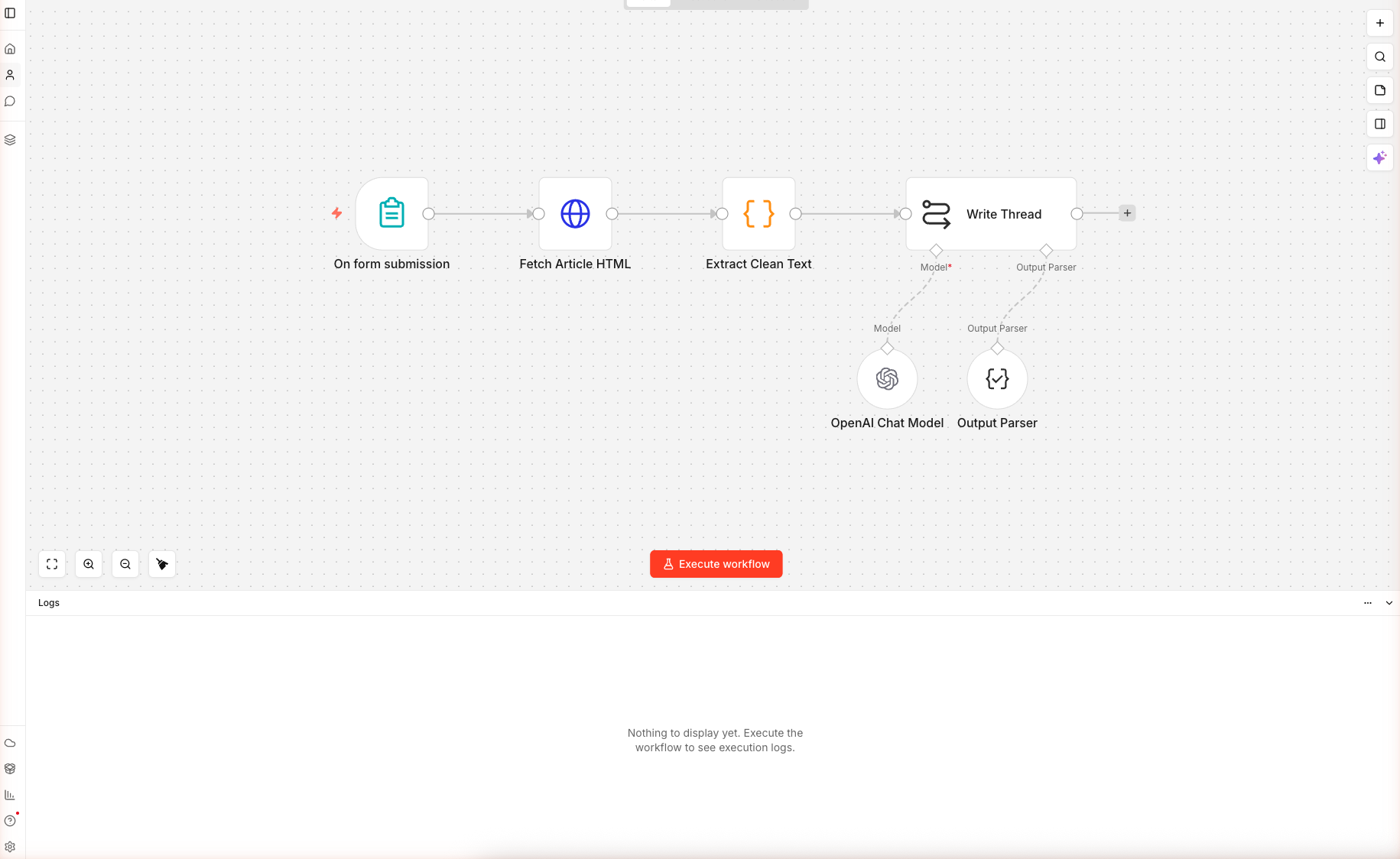
A six-node n8n workflow that:
- Accepts a blog URL + tone + tweet count through a public form
- Fetches the article HTML server-side (no browser spoofing needed)
- Strips nav, footer, scripts, and styles down to the real article text
- Sends everything to
gpt-5-minithrough a LangChain chain with an Output Parser that forces valid JSON - Returns a structured thread object:
{ hook, tweets[], cta, preview_card_headline }
Skip the Build — Import the Workflow
Create a new workflow, click the empty canvas, press Cmd+V / Ctrl+V. All six nodes load with their connections.
Prerequisites
| Requirement | Details |
|---|---|
| n8n account | Free trial on n8n.io/cloud |
| OpenAI credits | 100 free built into n8n — cover hundreds of threads |
| A live blog URL | Any article you want to repurpose |
| Time | ~12 minutes |
Nodes used: Form Trigger, HTTP Request, Code, Basic LLM Chain, OpenAI Chat Model (sub-node), Output Parser Structured (sub-node) — the last one is the star of this guide.
Step 1 — Import the Workflow
From the home dashboard, click + Create workflow. On the blank canvas, paste the JSON. The workflow loads as "AI Twitter Thread Writer" with all six nodes in place.
Double-click OpenAI Chat Model and confirm the credential shows n8n free OpenAI API credits and the model is gpt-5-mini with temperature 0.7 — higher than a blog-writing chain because threads benefit from more creative hook-writing.
Step 2 — Fetch the Article
Double-click Fetch Article HTML. The URL expression pulls from the form:
={{ $json['Article URL'] }}
The response is set to text (not auto-parsed JSON) because you're getting raw HTML. The neverError: true option keeps the workflow going if a site returns 403, 500, or times out — the next Code node handles empty input gracefully.
The User-Agent Matters
Under Headers → Header Parameters:
| Name | Value |
|---|---|
| User-Agent | Mozilla/5.0 (compatible; n8n-thread-writer/1.0) |
n8n's default User-Agent is n8n.io which gets rate-limited by some publications. The generic Mozilla UA passes most filters.
When this step fails: If you test with a Cloudflare-protected site and get 403, swap the Fetch Article HTML node for a call to Firecrawl, Browserless, or ScrapingBee. The Code node downstream doesn't care where the HTML came from.
Step 3 — Extract Clean Text
Double-click Extract Clean Text. This is a Code node with ~40 lines of JavaScript. Three things happen:
- Extract the title and meta description via regex on
<title>and<meta name="description"> - Strip noise — scripts, styles, nav, header, footer (these dominate the HTML but aren't the article)
- Decode HTML entities so
&becomes&and"becomes"
Then the body gets capped at 6,000 characters. Why? gpt-5-mini's context window can hold 40k+ input tokens, but past ~6k chars of prose, the thread starts paraphrasing the first half and ignoring the second. The cap keeps the thread focused on the article's argument.
const body = cleaned.slice(0, 6000);
return [{ json: { title, description, body, articleUrl, tone, tweetCount } }];
If you need the full article, switch to a chainMapReduce (LangChain's map-reduce chain) which summarizes chunks then combines summaries — but that's 3× the token cost.
Step 4 — The Prompt + Output Parser
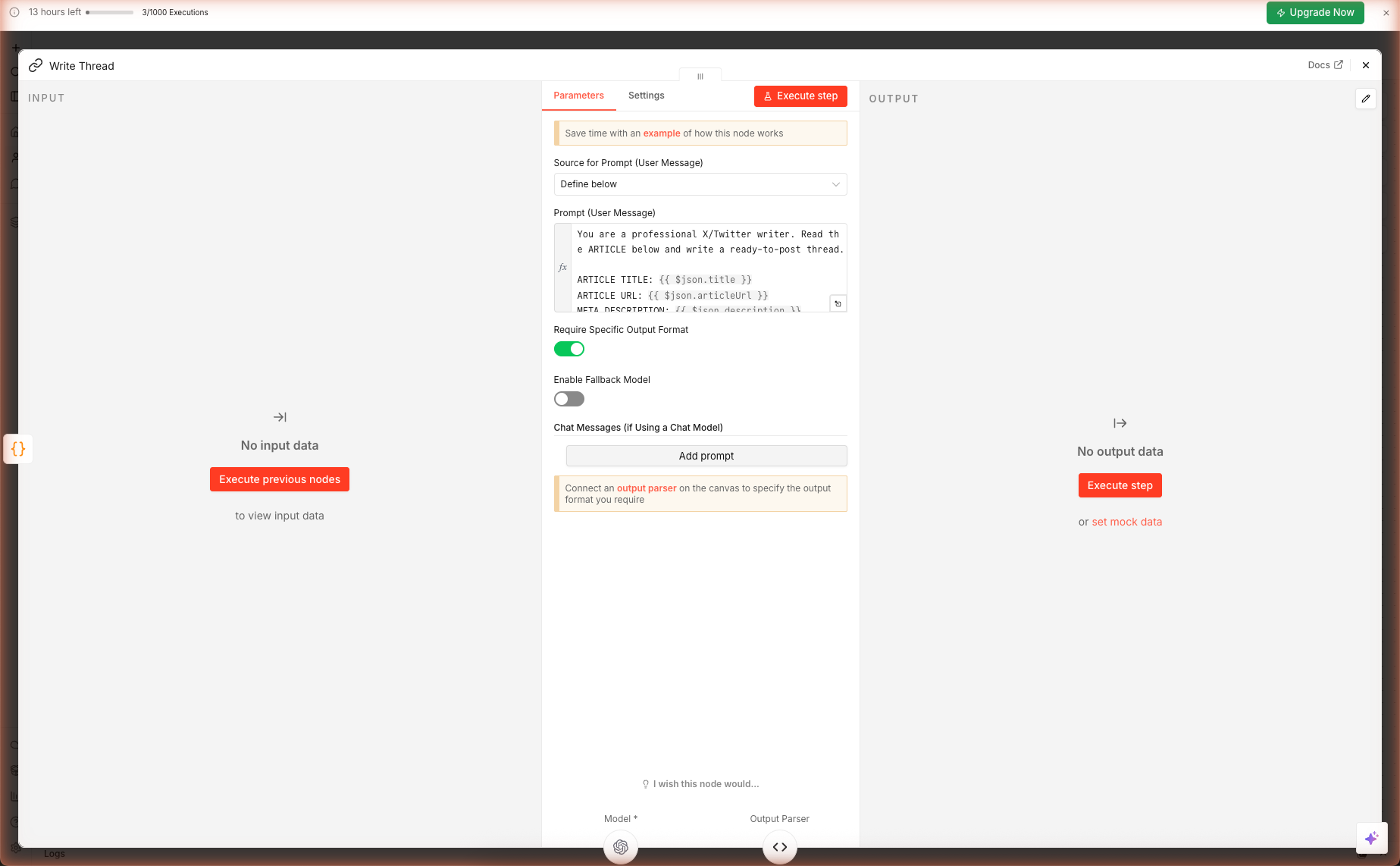
Double-click Write Thread. The prompt enforces eight rules:
| Rule | Why it's there |
|---|---|
| Tweet 1 = scroll-stopping hook, no "In this thread…" | Those openings kill thumb-scroll rate |
| Each tweet ≤ 270 chars | Leaves 10 chars for manual edits and variations |
| One idea per middle tweet | Threads that pack multiple ideas per tweet score worse in engagement |
| Concrete numbers, proper nouns, specifics | Vague generalities = instant scroll |
| Last tweet = CTA with URL + bookmark ask | "Bookmark + follow" double-taps the algorithm |
| Max 1 hashtag | Multi-hashtag threads are downranked |
| No emojis unless tone is Hot take | Professional tones look low-effort with emojis |
| No "In this thread I will cover..." | Classic low-engagement opener |
The Output Parser Magic
Scroll to the Output Parser sub-node (connected to the chain as ai_outputParser). Its JSON schema example:
{
  "hook": "string",
  "tweets": ["string"],
  "cta": "string",
  "preview_card_headline": "string"
}
The chain now enforces this shape. If gpt-5-mini returns malformed JSON or adds prose outside the JSON, n8n throws a clear error you can catch with an Error Trigger — or retry with maxAttempts: 2 in the node Settings tab.
Downstream nodes see the thread as a real object:
{{ $json.output.hook }}→ the hook tweet{{ $json.output.tweets[0] }}→ first middle tweet{{ $json.output.cta }}→ the closing CTA
No regex. No markdown stripping. Clean data.
⚠️ Known caveat we hit in testing:
gpt-5-minireturned the schema wrapped as{ "output": { ... } }instead of the bare object the Output Parser expects, causing strict-mode validation to throw "Model output doesn't fit required format". The AI's underlying response was correct — the strict parser just rejected the wrapper. Two fixes: (1) open the Write Thread node's Settings tab and set On Error toContinue (using error output)— the chain then surfaces the AI's raw text downstream and you parse it manually; (2) drop the Output Parser entirely and let the prompt's strict JSON instruction do the work alone. Option 2 is simpler for solo use; option 1 is better if you're piping into another node.
Step 5 — Run and Inspect
Click Test this trigger on the Form Trigger node, open the test URL, and submit a real article URL. Try one of your own posts or something from your favorite publication.
Watch the execution run node-by-node in the canvas. The final Write Thread node's output panel shows the parsed JSON. Copy the hook, tweets[], cta into X's compose pane and post as a thread — or send them downstream to an auto-post node (see Extensions).
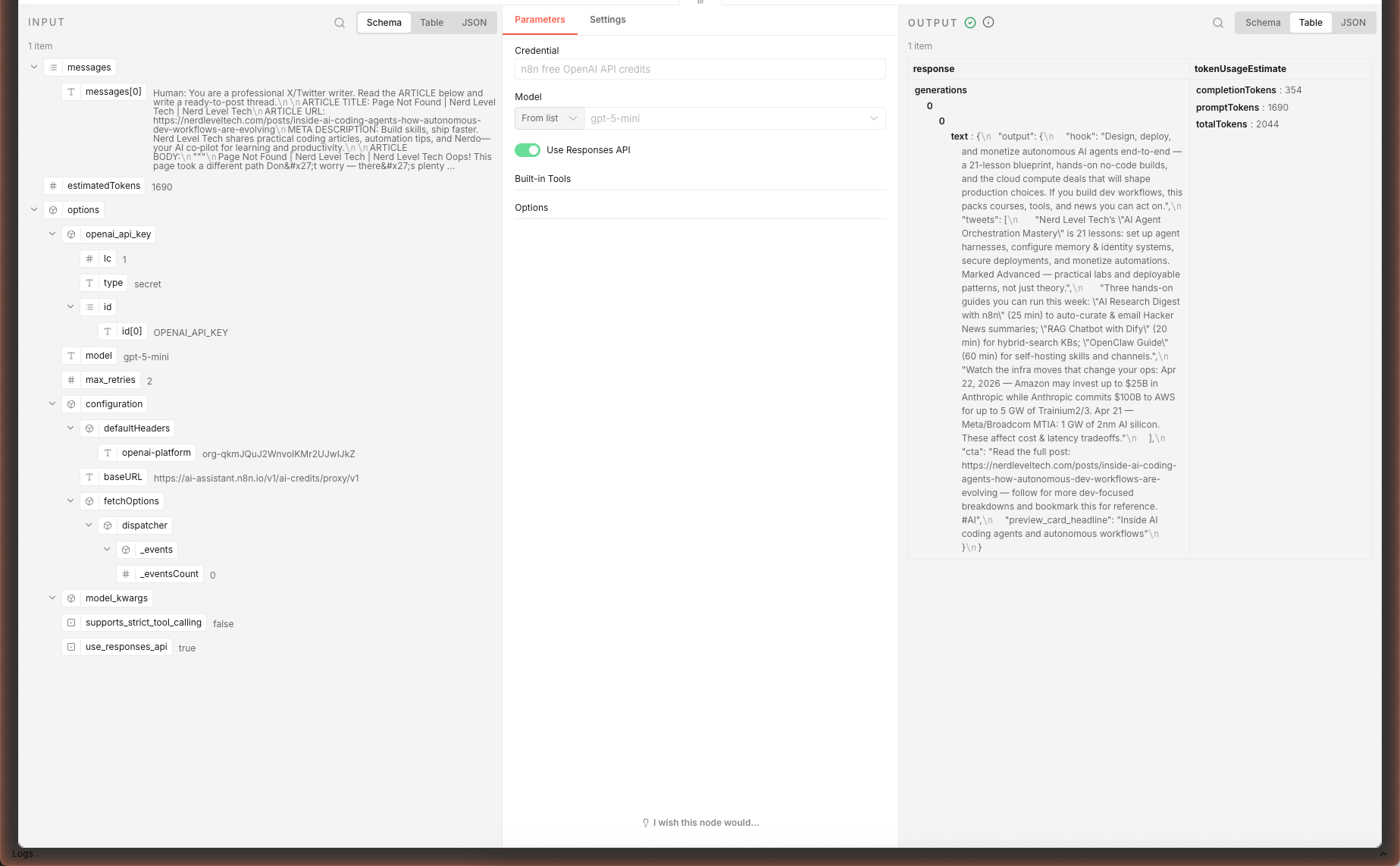
In our live test, feeding a 6,000-character article excerpt produced a structured 5-tweet thread with hook, three substantive middle tweets, and a CTA — ~26 seconds, ~2,044 tokens via gpt-5-mini. Each middle tweet picked a specific concrete fact from the source article (course count, lesson topics, infra commit numbers).
Checking Thread Quality Before Posting
Before hitting publish, verify:
| Check | What to look for |
|---|---|
| Hook | First 70 characters visible without the "Show more" click — put the payoff there |
| Tweet 2 | Must deliver something concrete from tweet 1's promise — not just restate |
| CTA | Low friction ask (bookmark > reply > DM > link click) |
| Specifics | Can you find each number/name in the source article? If not, the AI guessed — edit |
Extensions: Auto-Post to X, Schedule, or A/B
Auto-Post via X's API
After the Write Thread node, add an HTTP Request node for each tweet in the thread (or a Loop Over Items + single node). X's v2 API endpoint:
POST https://api.twitter.com/2/tweets
Authorization: Bearer <your OAuth2 token>
Content-Type: application/json

{ "text": "{{ $json.output.hook }}" }
Chain subsequent tweets with "reply": { "in_reply_to_tweet_id": "{{ $json.id }}" } to build the thread.
Schedule Threads with Typefully / Buffer / Hypefury
Most scheduling apps accept webhooks. Swap X's API for:
POST https://api.typefully.com/v1/drafts
…with your Typefully API key in the Authorization header and the thread as the body. You get drag-and-drop scheduling on top of AI generation.
A/B Test Two Threads From One Article
Duplicate the Write Thread and OpenAI Chat Model nodes. Give one temperature 0.4 (stable) and the other 0.9 (creative). Use a Merge node to zip the two outputs side-by-side, then pick the winner manually or feed both to an AI critic chain.
Bulk-Process a Backlog
Replace the Form Trigger with a Google Sheets Read node (or Airtable, Notion Database Read) that returns 50+ blog URLs. Add a Split In Batches node set to 1 item, and the rest of the workflow runs once per row. Cap concurrency to 3 to stay under API limits.
What's Next
You have a repeatable pipeline for turning any blog into a thread. Next, learn how to turn trending news into a daily digest → Multi-Source AI News Digest, or build an AI chatbot that knows your docs → Chat with a Webpage (RAG).
Frequently Asked Questions
Why not just ask gpt-5-mini for a plain-text thread?
Plain text is fine for a one-off. For automation, you need structured output so downstream nodes (Twitter API, buffer apps, spreadsheet loggers) can grab individual tweets without regex. The LangChain Output Parser in this workflow forces the AI to return valid JSON with four keys: `hook`, `tweets[]`, `cta`, `preview_card_headline`. If the AI drifts from schema, n8n catches the error immediately — set `maxAttempts: 2` in the chain's Settings tab and it retries once before failing.
Will the same workflow work for LinkedIn or Instagram caption formats?
Yes — clone the workflow and edit only the prompt in the Write Thread node. For LinkedIn, change the character limits (3000 per post, single post not thread), swap the JSON schema to `{ headline, body, hashtags }`, and raise the tone to professional. For Instagram captions, switch to a single long-form block with line-break formatting.
Some sites block the HTTP Request node. What then?
The workflow sends a generic User-Agent header which works for most blogs and publications. Cloudflare-protected sites and major news publishers (NYT, WSJ) block scrapers — for these, use a server-side scraping service like Browserless, ScrapingBee, or Firecrawl. Replace the Fetch Article HTML node's URL with the scraping service's endpoint, pass your target URL as a query param, and set the service's API key in the Headers tab.
How is Output Parser different from just asking the prompt to return JSON?
Output Parser adds three things plain prompting can't: (1) schema validation — if the AI returns malformed JSON, n8n catches it immediately and can retry; (2) a typed output — downstream nodes see `$json.tweets[0]` as a string, not a raw blob that needs parsing; (3) fewer bugs — you can't accidentally forget to wrap the JSON in a code fence or strip markdown ticks. For any n8n workflow that feeds AI into another service, always use Output Parser.
Related articles
Inside AI Coding Agents: How Autonomous Dev Workflows Are Evolving
Inside AI coding agents in 2026: architecture, planning loops, tool use, and frameworks like LangChain, CrewAI, and MCP. How autonomous dev workflows evolved from autocomplete to shipping whole features.
Prompt Engineering Mastery: The Art and Science of Talking to AI
A deep-dive into mastering prompt engineering — from crafting effective prompts to scaling AI workflows with reliability, performance, and precision.
More guides
Guide · 15 min read
AI Lead Enrichment + Personalized Outreach in n8n — 6 Nodes, One Form
Drop a lead's email and company URL into an n8n form. The workflow scrapes the company site, sniffs the tech stack, flags hiring/pricing/compliance signals, then asks gpt-5-mini to return a fit score, 3 reasons, and a personalized cold email. Schema-validated JSON output ready for CRM.
Guide · 16 min read
AI Competitor Page Monitor with Diff + Slack Alerts in n8n
A daily-scheduled n8n workflow that fetches your competitors' pricing and feature pages, hashes them against yesterday's snapshot in n8n static data, computes a sentence-level diff, and ships only the meaningful changes to Slack — powered by gpt-5-mini. Complete branching workflow with IF logic.
For AI agents:/for-agents/llms.txt/guides/n8n-twitter-thread-writer.md